


Excellent AZ-104 PDF Dumps With 100% ExamsTorrent Exam Passing Guaranted [Sep-2021]
100% Pass Your AZ-104 Microsoft Azure Administrator at First Attempt with ExamsTorrent
NEW QUESTION 54
You have an Azure subscription that contains a storage account named account1.
You plan to upload the disk files of a virtual machine to account1 from your on-premises network. The on- premises network uses a public IP address space of 131.107.1.0/24.
You plan to use the disk files to provision an Azure virtual machine named VM1. VM1 will be attached to a virtual network named VNet1. VNet1 uses an IP address space of 192.168.0.0/24.
You need to configure account1 to meet the following requirements:
* Ensure that you can upload the disk files to account1.
* Ensure that you can attach the disks to VM1.
* Prevent all other access to account1.
Which two actions should you perform? Each correct answer presents part of the solution.
NOTE: Each correct selection is worth one point.
- A. From the Firewalls and virtual networks blade of account1, add VNet1.
- B. From the Firewalls and virtual networks blade of account1, select Allow trusted Microsoft services to access this storage account.
- C. From the Service endpoints blade of VNet1, add a service endpoint.
- D. From the Firewalls and virtual networks blade of account1, select Selected networks.
- E. From the Firewalls and virtual networks blade of account1, add the 131.107.1.0/24 IP address range.
Answer: C,D
Explanation:
Section: [none]
Explanation:
A: By default, storage accounts accept connections from clients on any network. To limit access to selected networks, you must first change the default action.
Azure portal
1. Navigate to the storage account you want to secure.
2. Click on the settings menu called Firewalls and virtual networks.
3. To deny access by default, choose to allow access from 'Selected networks'. To allow traffic from all networks, choose to allow access from 'All networks'.
4. Click Save to apply your changes.
E: Grant access from a Virtual Network
Storage accounts can be configured to allow access only from specific Azure Virtual Networks.
By enabling a Service Endpoint for Azure Storage within the Virtual Network, traffic is ensured an optimal route to the Azure Storage service. The identities of the virtual network and the subnet are also transmitted with each request.
Reference:
https://docs.microsoft.com/en-us/azure/storage/common/storage-network-security
NEW QUESTION 55
HOTSPOT
You have an Azure subscription that contains the file shares shown in the following table.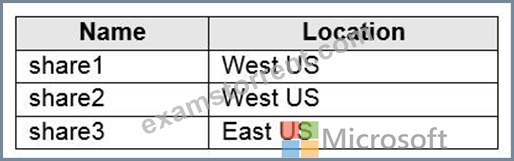
You have the on-premises file shares shown in the following table.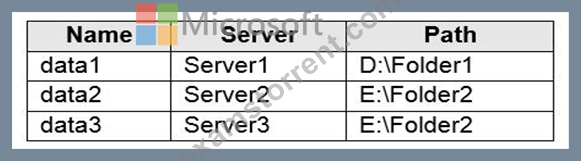
You create an Azure file sync group named Sync1 and perform the following actions:
* Add share1 as the cloud endpoint for Sync1.
* Add data1 as a server endpoint for Sync1.
* Register Server1 and Server2 to Sync1
.
For each of the following statements, select Yes if the statement is true. Otherwise, select No.
NOTE: Each correct selection is worth one point.
Answer:
Explanation:
Explanation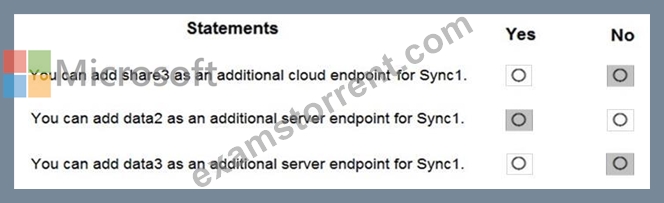
Box 1: No
A sync group must contain one cloud endpoint, which represents an Azure file share and one or more server endpoints.
Box 2: Yes
Data2 is located on Server2 which is registered to Sync1.
Box 3: No
Data3 is located on Server3 which is not registered to Sync1.
Reference:
https://docs.microsoft.com/en-us/azure/storage/files/storage-sync-files-deployment-guide?tabs=azure-portal%2C
NEW QUESTION 56
You have an Azure subscription that contains the resources in the following table.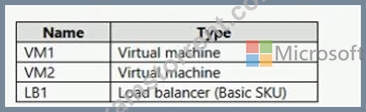
You install the Web Server server role (IIS) on VM1 and VM2, and then and VM1 and VM2 to LB1.
LB1 is configured as shown in the LB1 exhibit. (Click the LB1 tab.)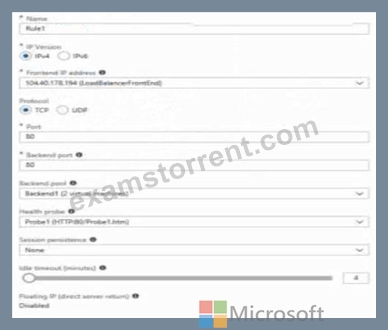
Rule1 is configure as shown in the Rule1 exhibit. (Click the Rule tab.) For each of the following statements, select Yes if the statements is true. Otherwise, select No.
NOTE: Each correct selection is worth one point.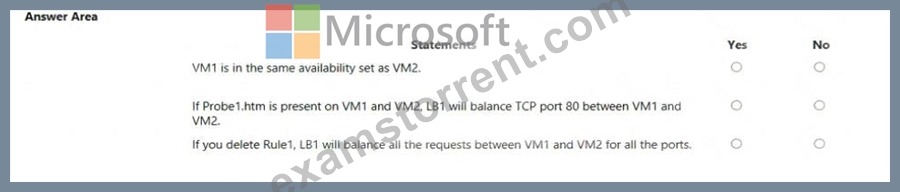
Answer:
Explanation: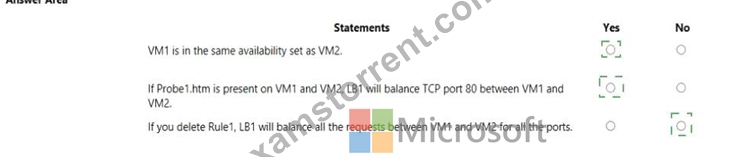
Explanation
Box 1: Yes
A Basic Load Balancer supports virtual machines in a single availability set or virtual machine scale set.
Box 2: Yes
When using load-balancing rules with Azure Load Balancer, you need to specify health probes to allow Load Balancer to detect the backend endpoint status. The configuration of the health probe and probe responses determine which backend pool instances will receive new flows. You can use health probes to detect the failure of an application on a backend endpoint. You can also generate a custom response to a health probe and use the health probe for flow control to manage load or planned downtime. When a health probe fails, Load Balancer will stop sending new flows to the respective unhealthy instance. Outbound connectivity is not impacted, only inbound connectivity is impacted.
Box 3: No
Reference:
https://docs.microsoft.com/en-us/azure/load-balancer/skus
https://docs.microsoft.com/en-us/azure/load-balancer/load-balancer-custom-probe-overview
NEW QUESTION 57
You manage two Azure subscriptions named Subscription1 and Subscription2.
Subscription1 has following virtual networks:
The virtual networks contain the following subnets:
Subscription2 contains the following virtual network:
* Name: VNETA
* Address space: 10.10.128.0/17
* Location: Canada Central
VNETA contains the following subnets:
For each of the following statements, select Yes if the statement is true. Otherwise, select No.
NOTE:Each correct selection is worth one point.
Answer:
Explanation:
Explanation
Box 1: Yes
With VNet-to-VNet you can connect Virtual Networks in Azure across Different regions.
Box 2: Yes
Azure supports the following types of peering:
Virtual network peering: Connect virtual networks within the same Azure region.
Global virtual network peering: Connecting virtual networks across Azure regions.
Box 3: No
The virtual networks you peer must have non-overlapping IP address spaces.
References:
https://azure.microsoft.com/en-us/blog/vnet-to-vnet-connecting-virtual-networks-in-azure-across-different-region
https://docs.microsoft.com/en-us/azure/virtual-network/virtual-network-manage-peering#requirements-and-const
NEW QUESTION 58
Your company has a main office in London that contains 100 client computers.
Three years ago, you migrated to Azure Active Directory (Azure AD).
The company's security policy states that all personal devices and corporate-owned devices must be registered or joined to Azure AD.
A remote user named User1 is unable to join a personal device to Azure AD from a home network.
You verify that other users can join their devices to Azure AD.
You need to ensure that User1 can join the device to Azure AD.
What should you do?
- A. Create a point-to-site VPN from the home network of User1 to Azure.
- B. From the Device settings blade, modify the Users may join devices to Azure AD setting.
- C. From the Device settings blade, modify the Maximum number of devices per user setting.
- D. Assign the User administrator role to User1.
Answer: C
Explanation:
Explanation
The Maximum number of devices setting enables you to select the maximum number of devices that a user can have in Azure AD. If a user reaches this quota, they will not be able to add additional devices until one or more of the existing devices are removed.
NEW QUESTION 59
Note: This question is part of a series of questions that present the same scenario. Each question in the series contains a unique solution that might meet the stated goals. Some question sets might have more than one correct solution, while others might not have a correct solution. After you answer a question in this section, you will NOT be able to return to it. As a result, these questions will not appear in the review screen.
You have an Azure subscription named Subscription1. Subscription1 contains a resource group named RG1. RG1 contains resources that were deployed by using templates. You need to view the date and time when the resources were created in RG1.
Solution: From the Subscriptions blade, you select the subscription, and then click Resource providers.
Does this meet the goal?
- A. No
- B. Yes
Answer: A
NEW QUESTION 60
You plan to deploy an Azure container instance by using the following Azure Resource Manager template.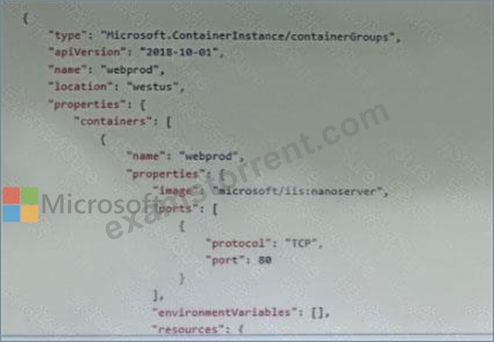


Use the drop-down menus to select the answer choice that completes each statement based on the information presented in the template.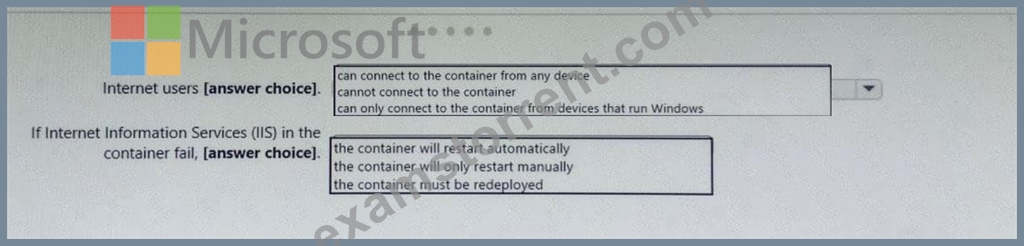
Answer:
Explanation: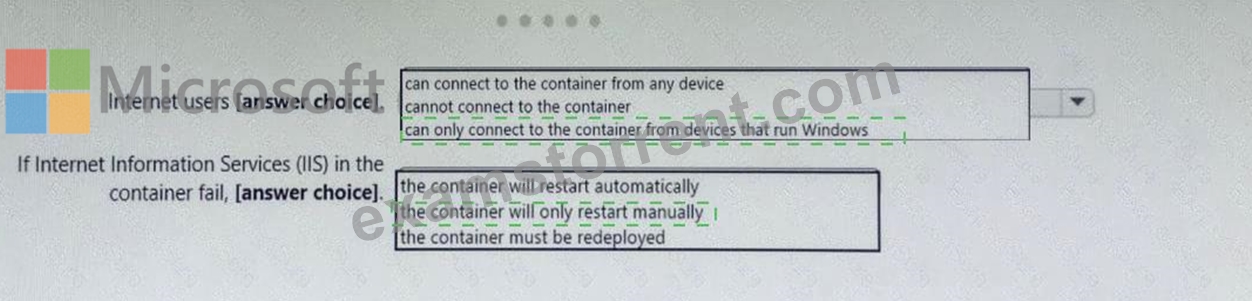
NEW QUESTION 61
Note: This question is part of a series of questions that present the same scenario. Each question in the series contains a unique solution that might meet the stated goals. Some question sets might have more than one correct solution, while others might not have a correct solution.
After you answer a question in this section, you will NOT be able to return to it. As a result, these questions will not appear in the review screen.
You have an Azure virtual machine named VM1. VM1 was deployed by using a custom Azure Resource Manager template named ARM1.json.
You receive a notification that VM1 will be affected by maintenance.
You need to move VM1 to a different host immediately.
Solution: From the Update management blade, you click Enable.
Does this meet the goal?
- A. No
- B. Yes
Answer: A
Explanation:
Section: [none]
Explanation:
You would need to redeploy the VM.
Reference:
https://docs.microsoft.com/en-us/azure/virtual-machines/windows/redeploy-to-new-node
NEW QUESTION 62
You have an Azure subscription named Subscription1 that contains the resources shown in the following table.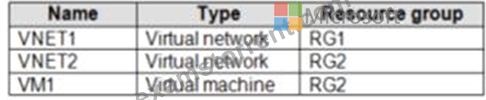
The status of VM1 is Running.
You assign an Azure policy as shown in the exhibit. (Click the Exhibit tab.)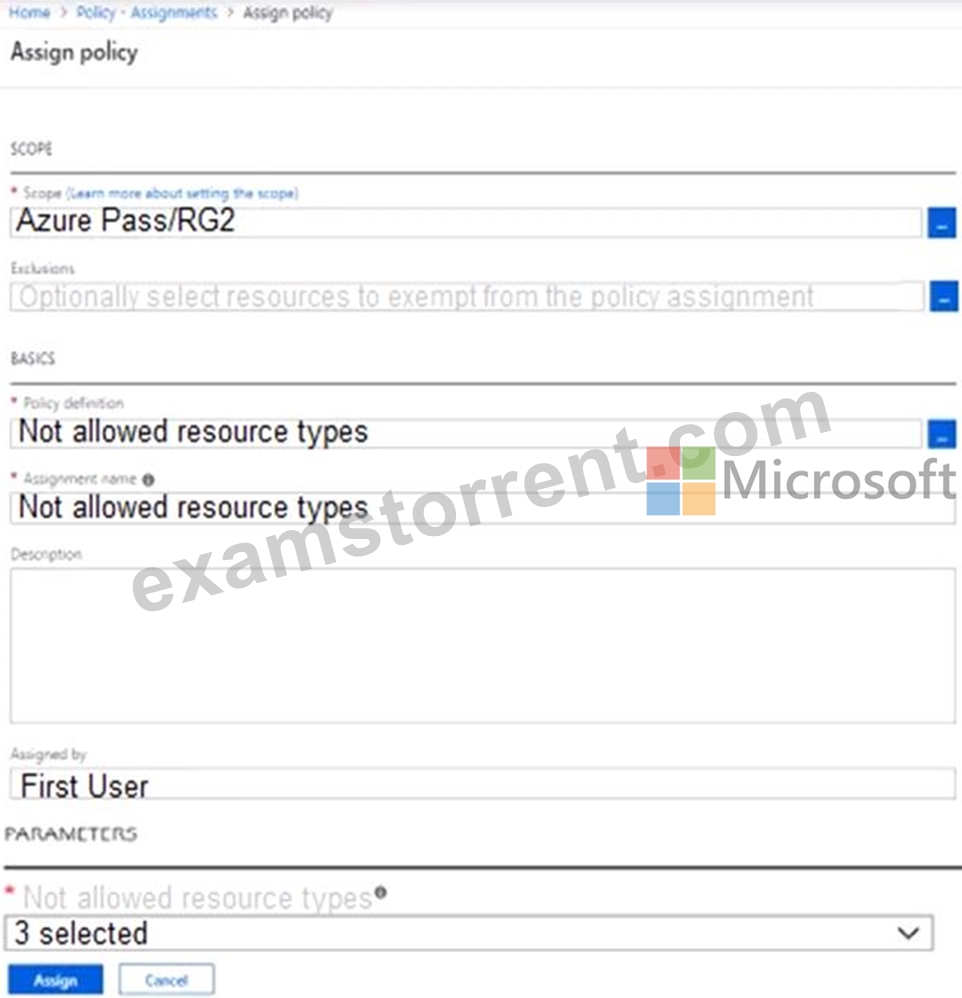
You assign the policy by using the following parameters:
For each of the following statements, select Yes if the statement is true. Otherwise, select No.
NOTE: Each correct selection is worth one point.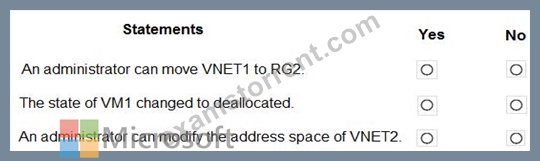
Answer:
Explanation: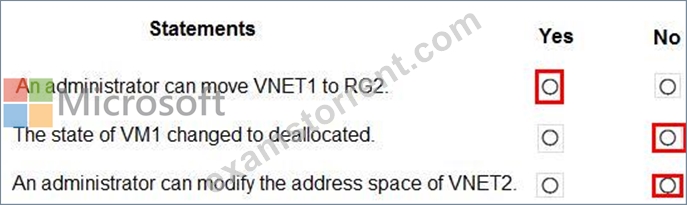
Reference:
https://docs.microsoft.com/en-us/azure/governance/policy/assign-policy-portal
NEW QUESTION 63
VM1 is running and connects to NIC1 and Disk1. NIC1 connects to VNET1.
RG2 contains a public IP address named IP2 that is in the East US location. IP2 is not assigned to a virtual machine.
For each of the following statements, select Yes if the statement is true. Otherwise, select No.
NOTE: Each correct selection is worth one point.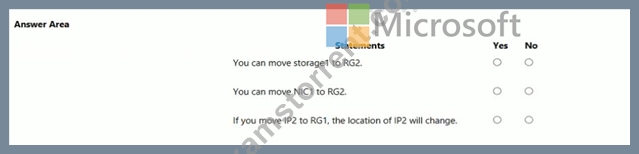
Answer:
Explanation: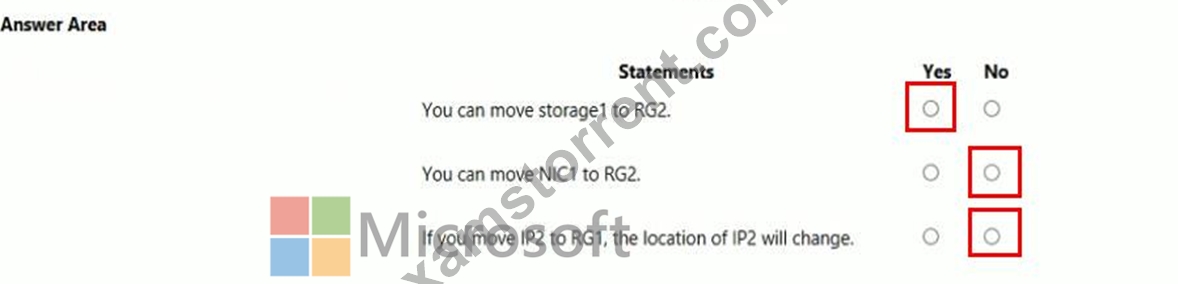
NEW QUESTION 64
You need to meet the user requirement for Admin1.
What should you do?
- A. From the Subscriptions blade, select the subscription, and then modify the Access control (IAM) settings.
- B. From the Azure Active Directory blade, modify the Properties.
- C. From the Subscriptions blade, select the subscription, and then modify the Properties.
- D. From the Azure Active Directory blade, modify the Groups.
Answer: C
Explanation:
Change the Service administrator for an Azure subscription
* Sign in to Account Center as the Account administrator.
* Select a subscription.
* On the right side, select Edit subscription details.
Scenario: Designate a new user named Admin1 as the service administrator of the Azure subscription.
References:
https://docs.microsoft.com/en-us/azure/billing/billing-add-change-azure-subscription-administrator
NEW QUESTION 65
You have an Azure subscription that contains several virtual machines and an Azure Log Analytics workspace named Workspace1. You create a log search query as shown in the following exhibit.
Use the drop-down menus to select the answer choice that completes each statement based on the information presented in the graphic.
NOTE: Each correct selection is worth one point.
Answer:
Explanation:
Explanation
Box 1: 14 days
Two weeks will be covered.
Note: Startofweek returns the start of the week containing the date, shifted by an offset, if provided.
Start of the week is considered to be a Sunday.
Endofweek returns the end of the week containing the date, shifted by an offset, if provided.
Last day of the week is considered to be a Saturday.
Box 2:
The render operator renders results in as graphical output. Timechart is a Line graph, where the first column is x-axis, and should be datetime. Other columns are y-axes. In this case the Y axis has avg(CounterValue) Values.
References:
https://docs.microsoft.com/en-us/azure/azure-monitor/log-query/log-query-overview
https://docs-analytics-eus.azurewebsites.net/queryLanguage/query_language_renderoperator.html
NEW QUESTION 66
You have an Azure subscription named Subscription1.
In Subscription1, you create an Azure web app named WebApp1. WebApp1 will access an external service that requires certificate authentication.
You plan to require the use of HTTPS to access WebApp1.
You need to upload certificates to WebApp1.
In which formats should you upload the certificate? To answer, select the appropriate options in the answer area.
NOTE: Each correct selection is worth one point.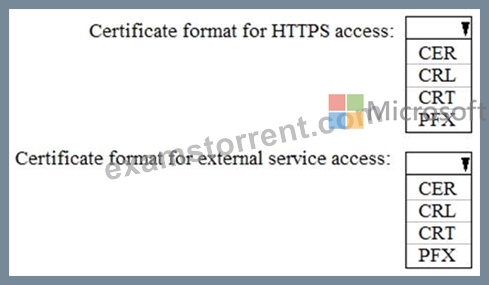
Answer:
Explanation: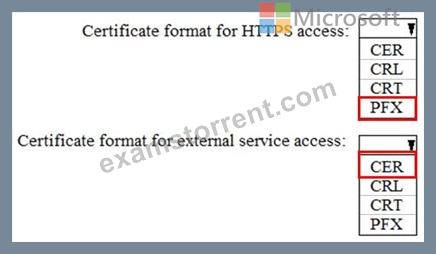
Explanation:
A PFX file contains the public key file (SSL Certificate) and its unique private key file. This is required for HTTPS access. The web app will distribute the public key (in a CER file) to clients that connect to the web app.
The CER file is an SSL Certificate which has the public key of the external service. The external service will have the private key associated with the public key contained in the CER file.
NEW QUESTION 67
You have an Azure subscription named AZPT1 that contains the resources shown in the following table: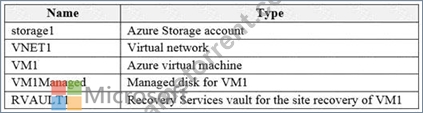
You create a new Azure subscription named AZPT2.
You need to identify which resources can be moved to AZPT2.
Which resources should you identify?
- A. RVAULT1 only
- B. VM1, storage1, VNET1, VM1Managed, and RVAULT1
- C. VM1, storage1, VNET1, and VM1Managed only
- D. VM1 and VM1Managed only
Answer: B
Explanation:
Explanation
You can move a VM and its associated resources to a different subscription by using the Azure portal.
You can now move an Azure Recovery Service (ASR) Vault to either a new resource group within the current subscription or to a new subscription.
Reference:
https://docs.microsoft.com/en-us/azure/azure-resource-manager/management/move-resource-group-and-subscrip
https://docs.microsoft.com/en-us/azure/key-vault/general/keyvault-move-subscription
NEW QUESTION 68
You have an Azure subscription.
You need to implement a custom policy that meet the following requirements:
*Ensures that each new resource group in the subscription has a tag named organization set to a value of Contoso.
*Ensures that resource group can be created from the Azure portal.
*Ensures that compliance reports in the Azure portal are accurate.
How should you complete the policy? To answer, select the appropriate options in the answers area.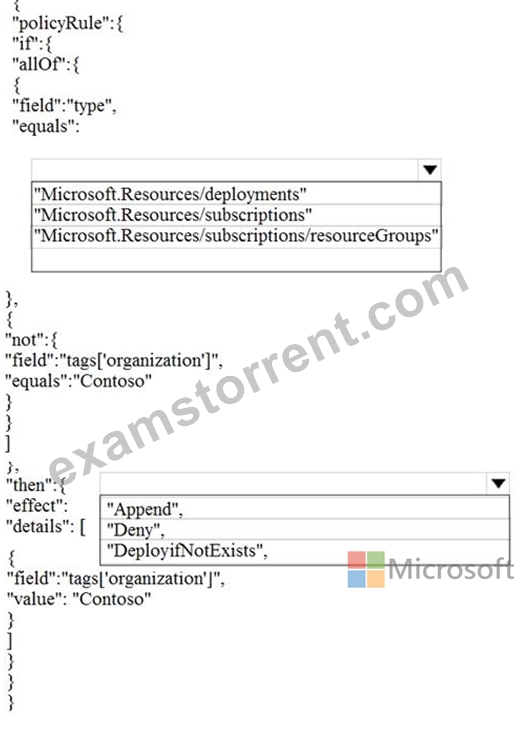
Answer:
Explanation: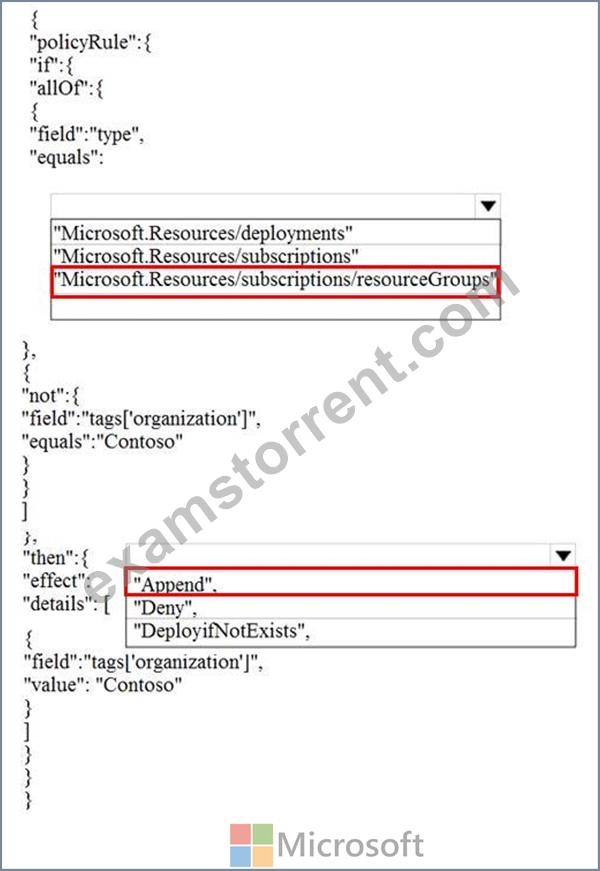
Reference:
https://docs.microsoft.com/en-us/azure/governance/policy/concepts/definition-structure
https://docs.microsoft.com/en-us/azure/role-based-access-control/custom-roles
https://docs.microsoft.com/en-us/azure/governance/policy/concepts/effects
NEW QUESTION 69
You have an on-premises network that you plan to connect to Azure by using a site-to-site VPN.
In Azure, you have an Azure virtual network named VNet1 that uses an address space of 10.0.0.0/16. VNet1 contains a subnet named Subnet1 that uses an address space of 10.0.0.0/24.
You need to create a site-to-site VPN to Azure.
Which four actions should you perform in sequence? To answer, move the appropriate actions from the list of actions to the answer area and arrange them in the correct order.
NOTE: More than one order of answer choices is correct. You will receive credit for any of the correct orders you select.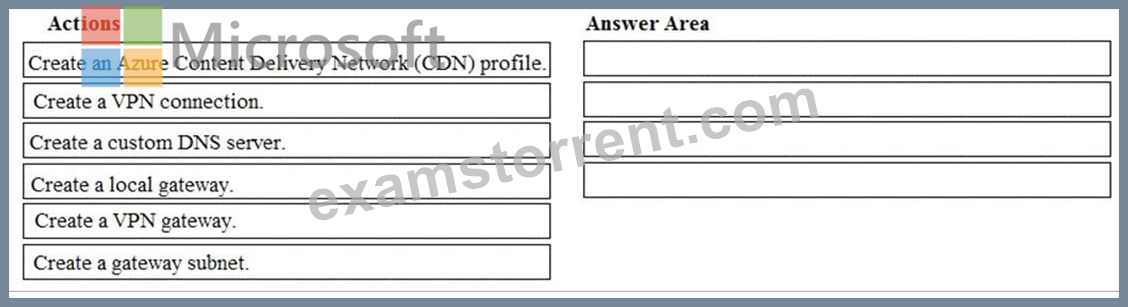
Answer:
Explanation: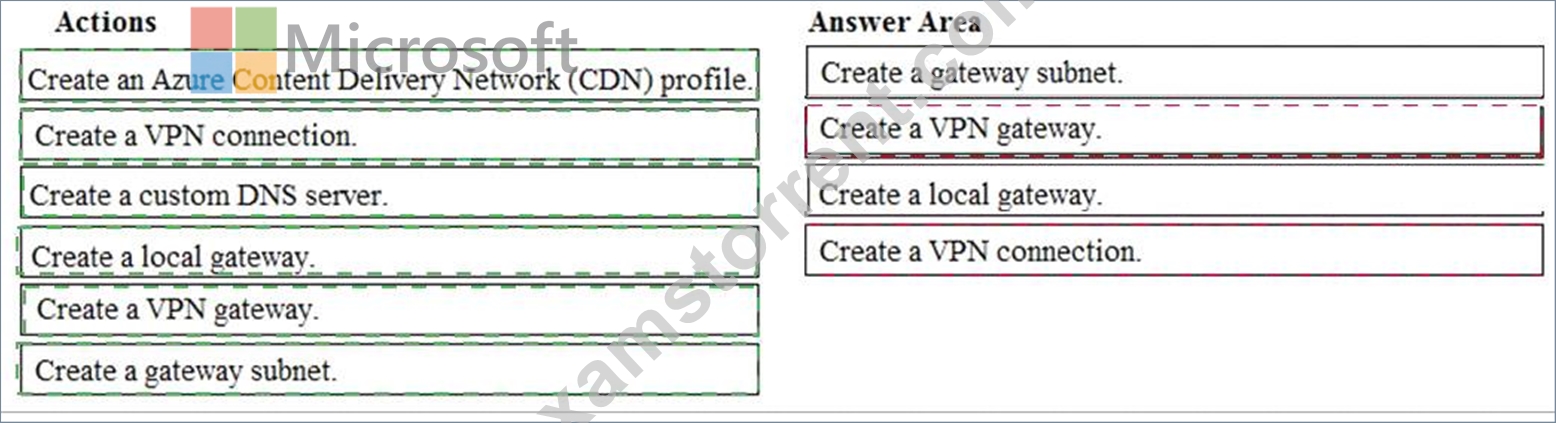
Explanation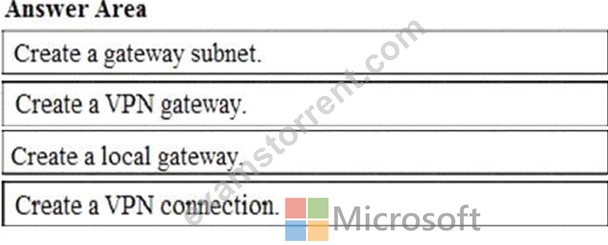
Note: More than one order of answer choices is correct.
Creating a local gateway (a logical object that represents the on-premise router) can be done at step 1, step 2 or step 3. The other three steps must be done in order: create gateway subnet then create VPN gateway then create the VPN connection. The VPN connection is a connection between the VPN gateway and the Local gateway.
NEW QUESTION 70
You have an Azure subscription named Subscription1. Subscription1 contains the resources in the following table.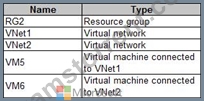
In Azure, you create a private DNS zone named adatum.com. You set the registration virtual network to VNet2. The adatum.com zone is configured as shown in the following exhibit.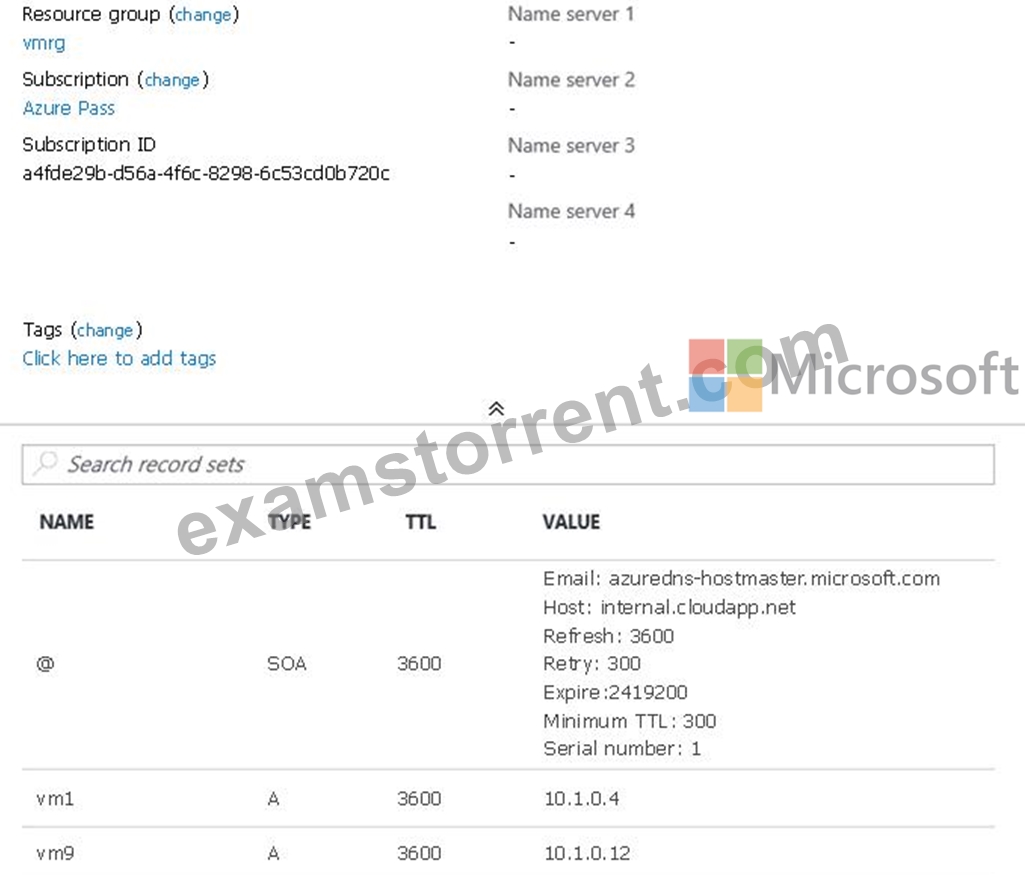
For each of the following statements, select Yes if the statement is true. Otherwise, select No.
NOTE: Each correct selection is worth one point.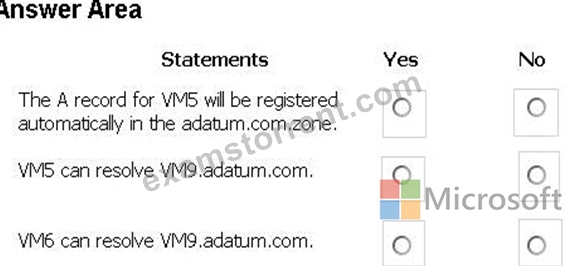
Answer:
Explanation: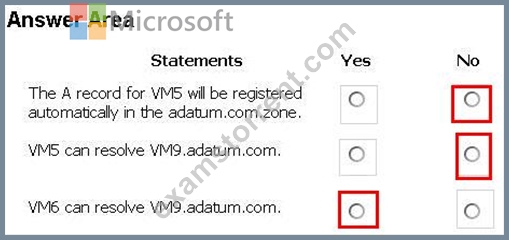
References: https://docs.microsoft.com/en-us/azure/dns/private-dns-overview
NEW QUESTION 71
You have an Azure subscription that contains a storage account.
You have an on-premises server named Server1 that runs Window Server 2016. Server1 has 2 TB of data.
You need to transfer the data to the storage account by using the Azure Import/Export service.
In which order should you perform the actions? To answer, move all actions from the list of actions to the answer area and arrange them in the correct order.
NOTE: More than one order of answer choices is correct. You will receive credit for any of the correct orders you select.
Answer:
Explanation:
At a high level, an import job involves the following steps:
Step 1: Attach an external disk to Server1 and then run waimportexport.exe Determine data to be imported, number of drives you need, destination blob location for your data in Azure storage.
Use the WAImportExport tool to copy data to disk drives. Encrypt the disk drives with BitLocker.
Step 2: From the Azure portal, create an import job.
Create an import job in your target storage account in Azure portal. Upload the drive journal files.
Step 3: Detach the external disks from Server1 and ship the disks to an Azure data center.
Provide the return address and carrier account number for shipping the drives back to you.
Ship the disk drives to the shipping address provided during job creation.
Step 4: From the Azure portal, update the import job
Update the delivery tracking number in the import job details and submit the import job.
The drives are received and processed at the Azure data center.
The drives are shipped using your carrier account to the return address provided in the import job.
References:
https://docs.microsoft.com/en-us/azure/storage/common/storage-import-export-service
NEW QUESTION 72
You create an Azure web app named WebApp1. WebApp1 has the autoscale settings shown in the following exhibit.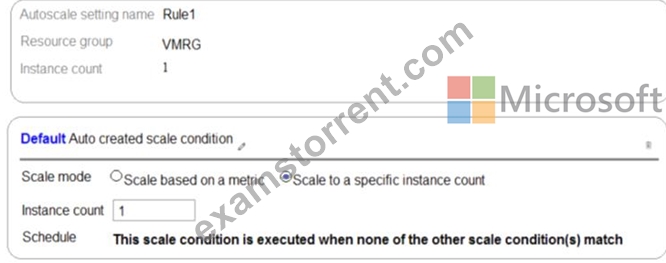
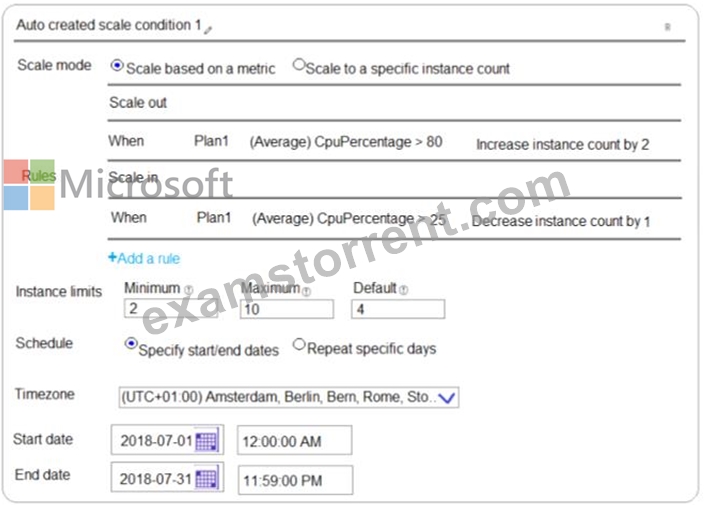
The scale out and scale in rules are configured to have a duration of 10 minutes and a cool down time of five minutes.
Use the drop-down menus to select the answer choice that completes each statement based on the information presented in the graphic.
NOTE: Each correct selection is worth one point.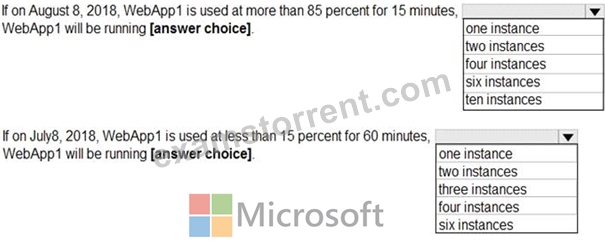
Answer:
Explanation: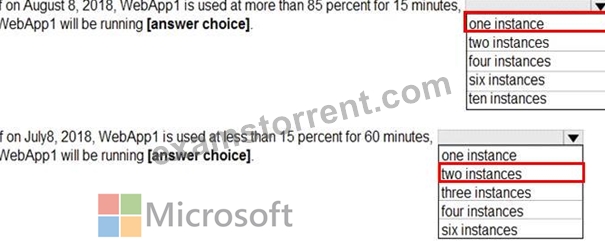
Explanation:
Box 1: one instance
Refer to scaling condition provided in the question, August 8, 2018 is outside the schedule of the scale condition 1, and Default instance count is 1.
Box 2: two instances
The default instance count is important because autoscale scales your service to that count when metrics are not available. Therefore, select a default instance count that's safe for your workloads.
The Default instance count of scale condition 1 is 4, and the Scale in rule decreases the count with 1.
So initial instance count before scale in condition met = 4
CPU utilization was at 15% for 60 mins so after first 10 mins ( The scale out and scale in rules are configured to have a duration of 10 minutes )instance count reduces by 1 hence after first 10 mins instance count is 4-1=3
Now cool down period is 5 mins , after first 15 mins instance count is 3 .
After next 15 mins , instance count will be 3-1=2.
After next 15 mins , instance count will be =2 because minimum instance count must be 2 , it can't get reduced beyond 2.
So after 60 mins instance count will be at 2.
Reference:
https://docs.microsoft.com/en-us/azure/azure-monitor/platform/autoscale-best-practices
NEW QUESTION 73
You create a Recovery Services vault backup policy named Policy1 as shown in the following exhibit.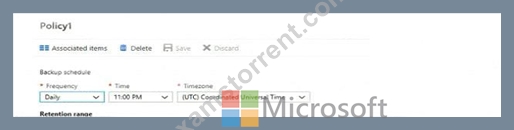
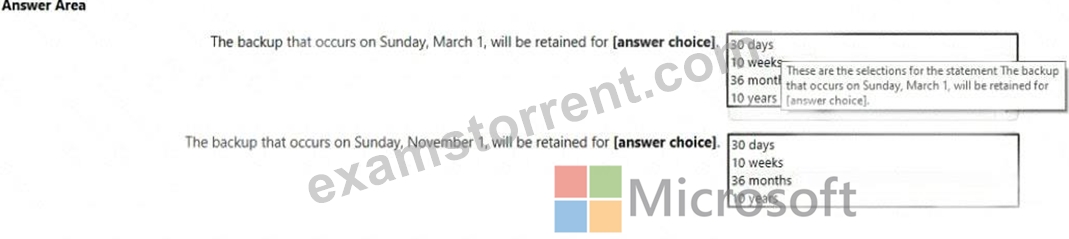
Answer:
Explanation: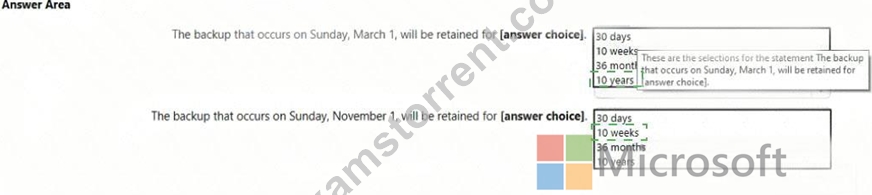
Explanation
NEW QUESTION 74
You have an Azure subscription.
You plan to deploy an Azure Kubernetes Service (AKS) cluster to support an app named App1. On-premises clients connect to App1 by using the IP address of the pod.
For the AKS cluster, you need to choose a network type that will support App1.
What should you choose?
- A. kubenet
- B. Hybrid Connection endpoints
- C. Azure Container Networking Interface (CNI)
- D. Azure Private Link
Answer: C
Explanation:
With Azure CNI, every pod gets an IP address from the subnet and can be accessed directly. These IP addresses must be unique across your network space.
Incorrect Answers:
A: The kubenet networking option is the default configuration for AKS cluster creation. With kubenet, nodes get an IP address from the Azure virtual network subnet. Pods receive an IP address from a logically different address space to the Azure virtual network subnet of the nodes. Network address translation (NAT) is then configured so that the pods can reach resources on the Azure virtual network.
C, D: AKS only supports Kubenet networking and Azure Container Networking Interface (CNI) networking Reference:
https://docs.microsoft.com/en-us/azure/aks/concepts-network
NEW QUESTION 75
Hotspot Question
You have an Azure subscription.
You need to implement a custom policy that meet the following requirements:
* Ensures that each new resource group in the subscription has a tag
named organization set to a value of Contoso.
* Ensures that resource group can be created from the Azure portal.
* Ensures that compliance reports in the Azure portal are accurate.
How should you complete the policy? To answer, select the appropriate options in the answers area.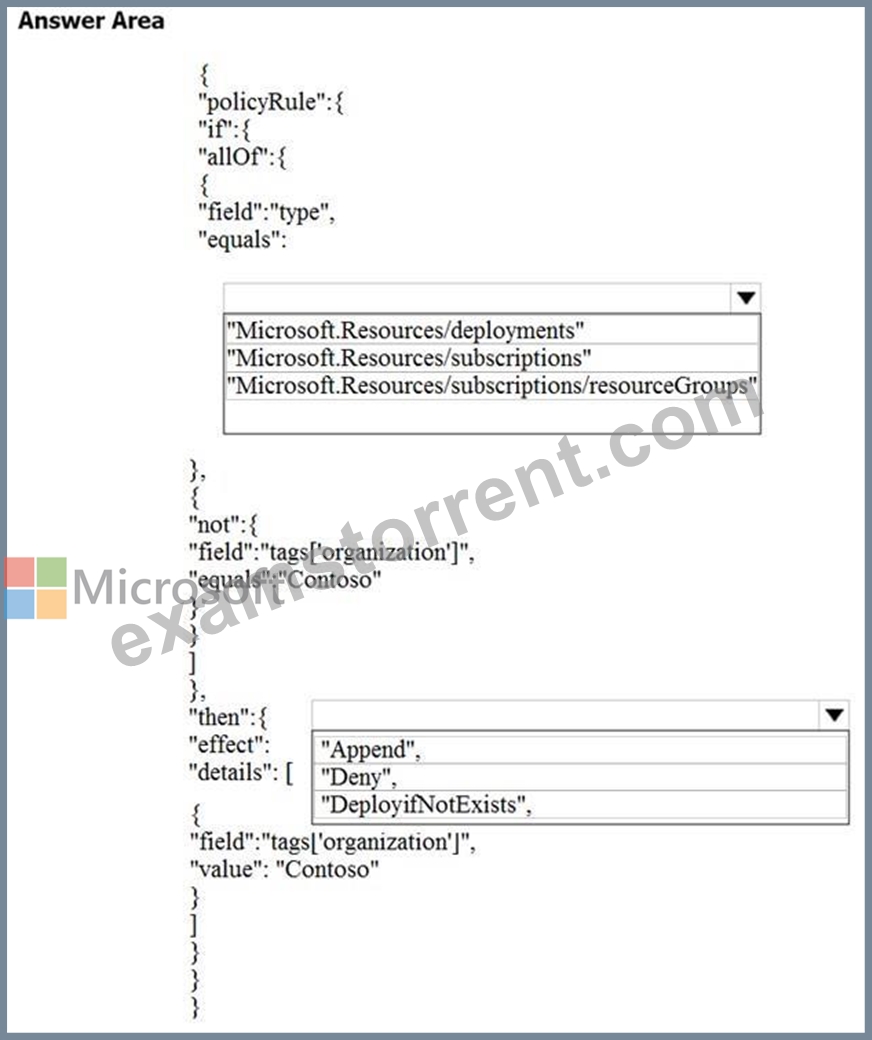
Answer:
Explanation: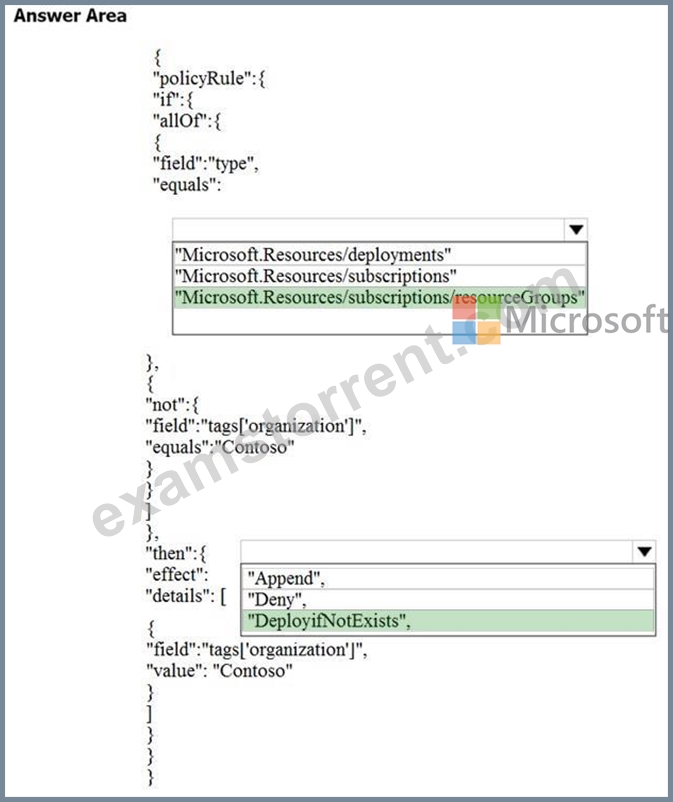
NEW QUESTION 76
You have a virtual network named VNet1 that has the configuration shown in the following exhibit.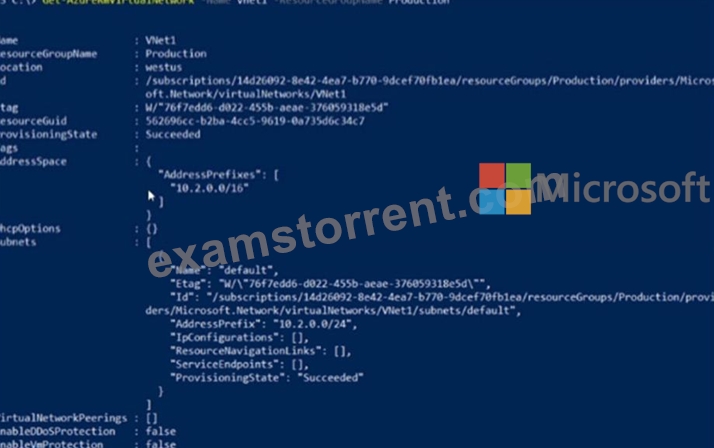
Use the drop-down menus to select the answer choice that completes each statement based on the information presented in the graphic.
NOTE: Each correct selection is worth one point.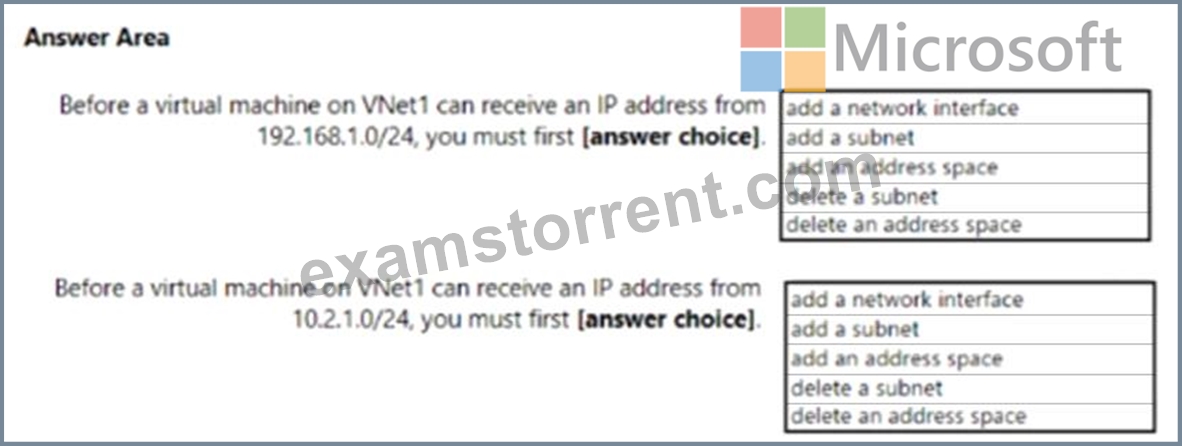
Answer:
Explanation: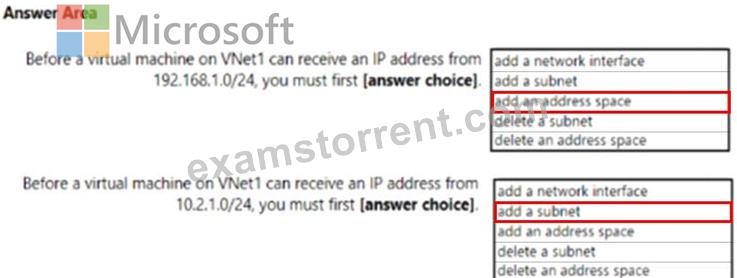
Explanation:
Box 1: add an address space
Your IaaS virtual machines (VMs) and PaaS role instances in a virtual network automatically receive a private IP address from a range that you specify, based on the address space of the subnet they are connected to. We need to add the 192.168.1.0/24 address space.
Box 2: add a subnet
Address space is present but need to add subnet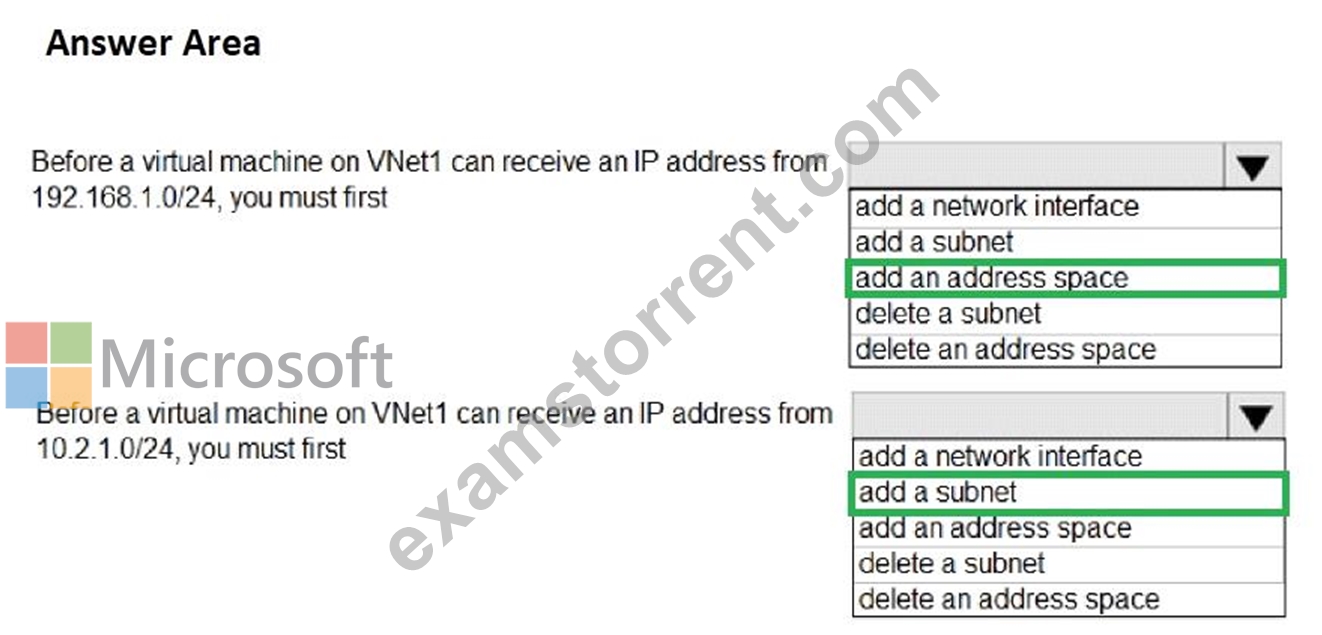
References:
https://docs.microsoft.com/en-us/microsoft-365/solutions/cloud-architecture-models?view=o365-worldwide
https://docs.microsoft.com/en-us/azure/virtual-network/virtual-networks-static-private-ip-arm-pportal
NEW QUESTION 77
You have an Azure virtual machine named VM1 that runs Windows Server 2019.
You save VM1 as a template named Template1 to the Azure Resource Manager library.
You plan to deploy a virtual machine named VM2 from Template1.
What can you configure during the deployment of VM2?
- A. virtual machine size
- B. operating system
- C. resource group
- D. administrator username
Answer: D
Explanation:
Section: Deploy and manage Azure compute resources
Explanation:
When deploying a virtual machine from a template, you must specify:
* the Resource Group name and location for the VM
* the administrator username and password
* an unique DNS name for the public IP
Reference:
https://docs.microsoft.com/en-us/azure/virtual-machines/windows/ps-template
NEW QUESTION 78
......
Trend for AZ-104 pdf dumps before actual exam: https://www.examstorrent.com/AZ-104-exam-dumps-torrent.html
Real Exam Questions & Answers - Microsoft AZ-104 Dump is Ready: https://drive.google.com/open?id=1G2UvLfr_LK2B73SVpj23cVLleA4v2KeD