


CKA Free Exam Questions & Answers PDF Updated on Jan-2022
Latest CKA Exam Dumps Recently Updated 63 Questions
How much Linux Foundation-CKA: Certified Kubernetes Administrator Cost and Details
Examination Name: Linux Foundation-CKA: Certified Kubernetes Administrator Passing Score: 66% or higher Length of Exam: 120 min Types of questions: Multiple Choice Questions No. of Questions: 24 Questions Examination Fees: $300 USD Retake Exam: Free
NEW QUESTION 26
Check to see how many worker nodes are ready (not including nodes tainted NoSchedule) and write the number to /opt/KUCC00104/kucc00104.txt.
Answer:
Explanation:
See the solution below.
Explanation
solution
F:\Work\Data Entry Work\Data Entry\20200827\CKA\15 B.JPG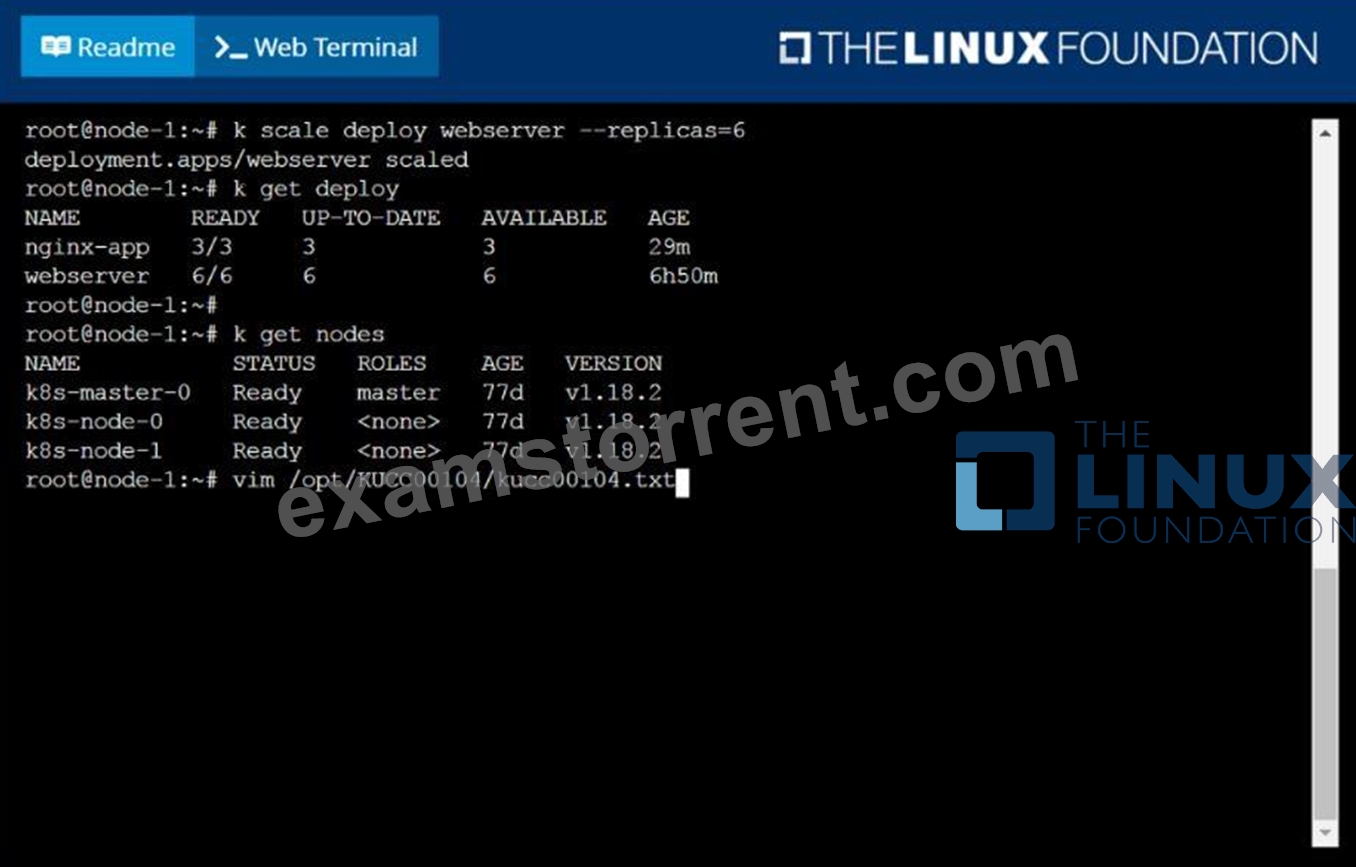
F:\Work\Data Entry Work\Data Entry\20200827\CKA\15 C.JPG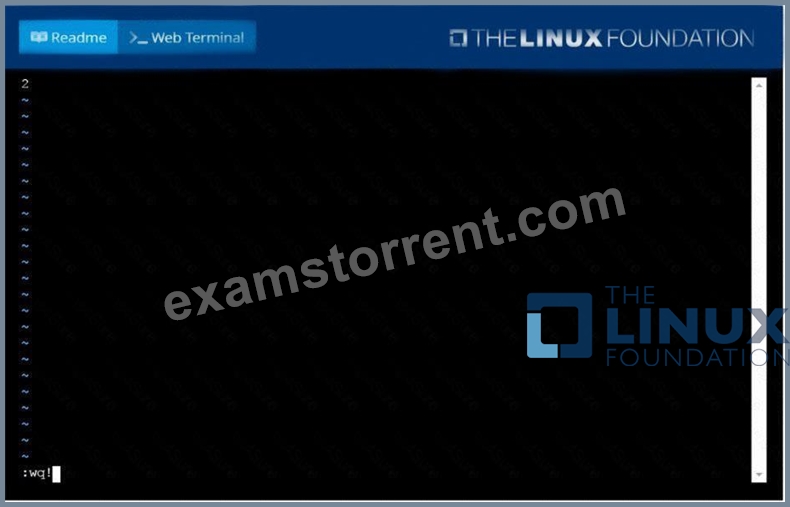
NEW QUESTION 27
Create a hostPath PersistentVolume named task-pv-volume with storage 10Gi, access modes ReadWriteOnce, storageClassName manual, and volume at /mnt/data and verify
- A. vim task-pv-volume.yaml
apiVersion: v1
kind: PersistentVolume
metadata:
name: task-pv-volume
labels:
type: local
spec:
storageClassName: ""
capacity:
storage: 5Gi
accessModes:
- ReadWriteOnce
hostPath:
path: "/mnt/data"
kubectl apply -f task-pv-volume.yaml
//Verify
kubectl get pv
NAME CAPACITY ACCESS
MODES RECLAIM POLICY STATUS CLAIM
STORAGECLASS REASON AGE
task-pv-volume 4Gi RWO
Retain Available
8s - B. vim task-pv-volume.yaml
apiVersion: v1
kind: PersistentVolume
metadata:
name: task-pv-volume
labels:
type: local
spec:
storageClassName: ""
capacity:
storage: 5Gi
accessModes:
- ReadWriteOnce
hostPath:
path: "/mnt/data"
kubectl apply -f task-pv-volume.yaml
//Verify
kubectl get pv
NAME CAPACITY ACCESS
MODES RECLAIM POLICY STATUS CLAIM
STORAGECLASS REASON AGE
task-pv-volume 5Gi RWO
Retain Available
3s
Answer: B
NEW QUESTION 28
Create a busybox pod and add "sleep 3600" command
Answer:
Explanation:
kubectl run busybox --image=busybox --restart=Never -- /bin/sh -c "sleep 3600"
NEW QUESTION 29
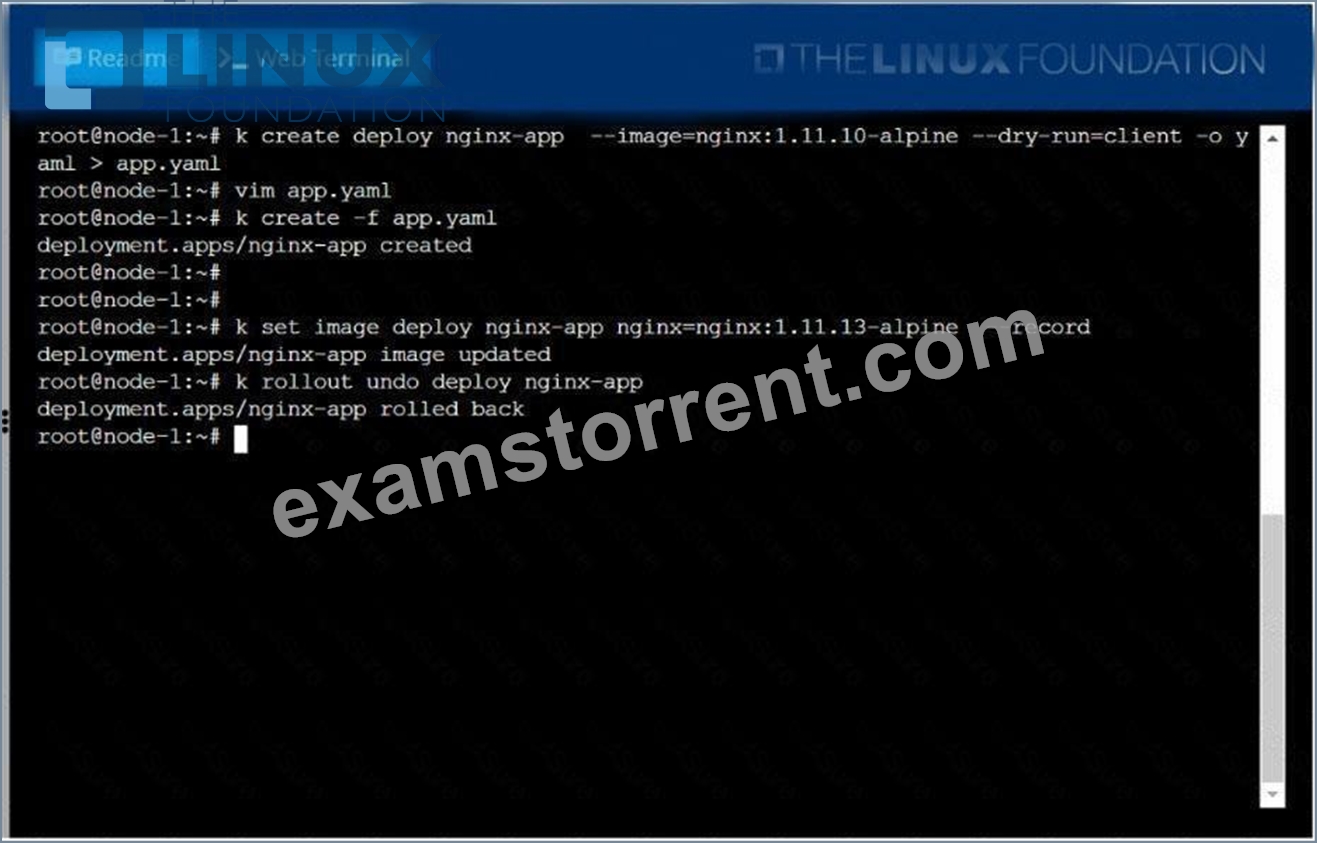
Create a deployment as follows:
* Name: nginx-app
* Using container nginx with version 1.11.10-alpine
* The deployment should contain 3 replicas
Next, deploy the application with new version 1.11.13-alpine, by performing a rolling update.
Finally, rollback that update to the previous version 1.11.10-alpine.
Answer:
Explanation:
See the solution below.
Explanation
solution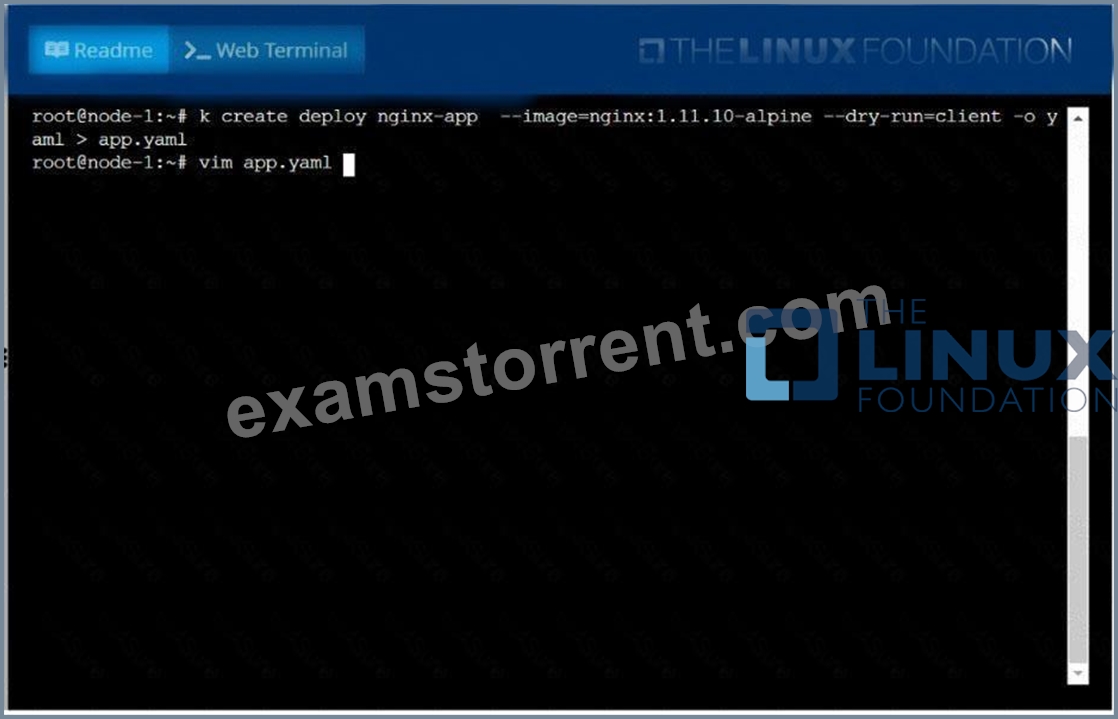
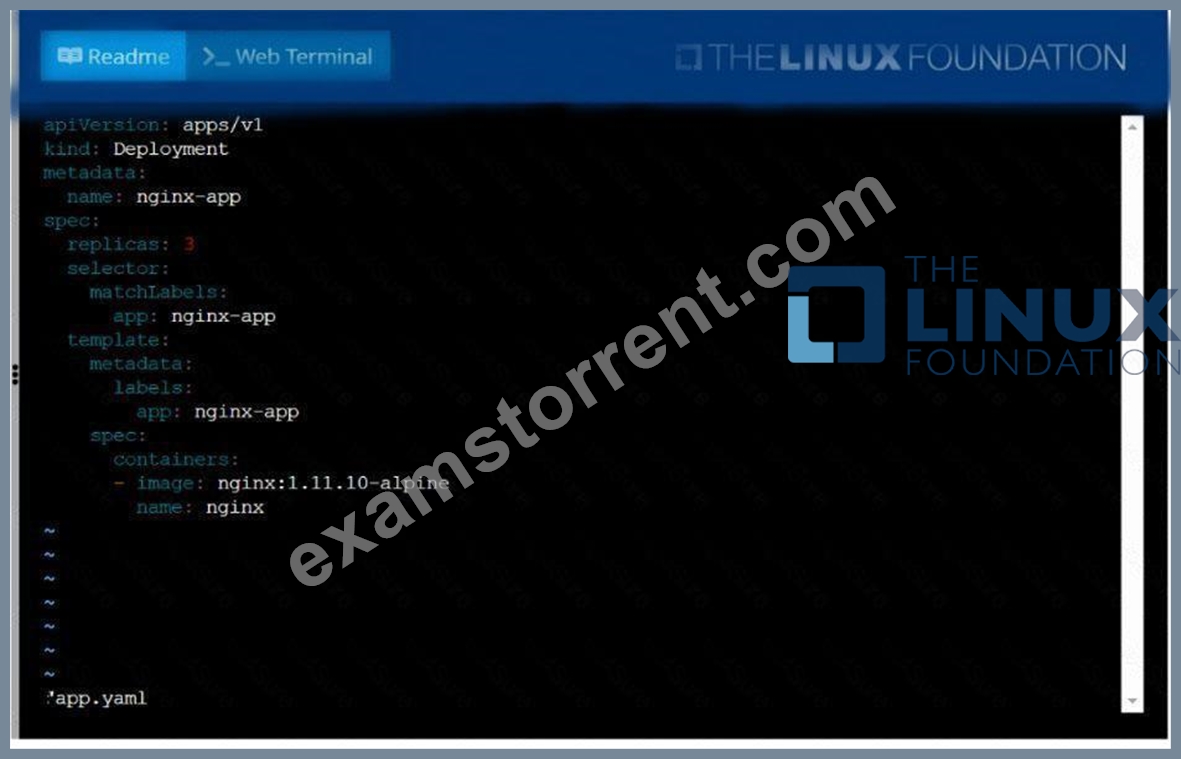
NEW QUESTION 30
List all the pods sorted by name
Answer:
Explanation:
See the solution below.
Explanation
kubectl get pods --sort-by=.metadata.name
NEW QUESTION 31
Get list of persistent volumes and persistent volume claim in the cluster
Answer:
Explanation:
kubectl get pv kubectl get pvc
NEW QUESTION 32
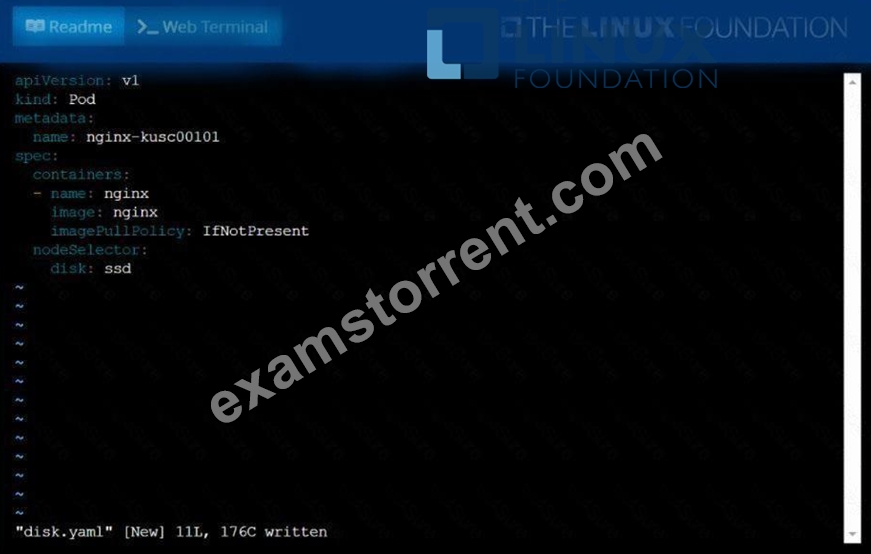
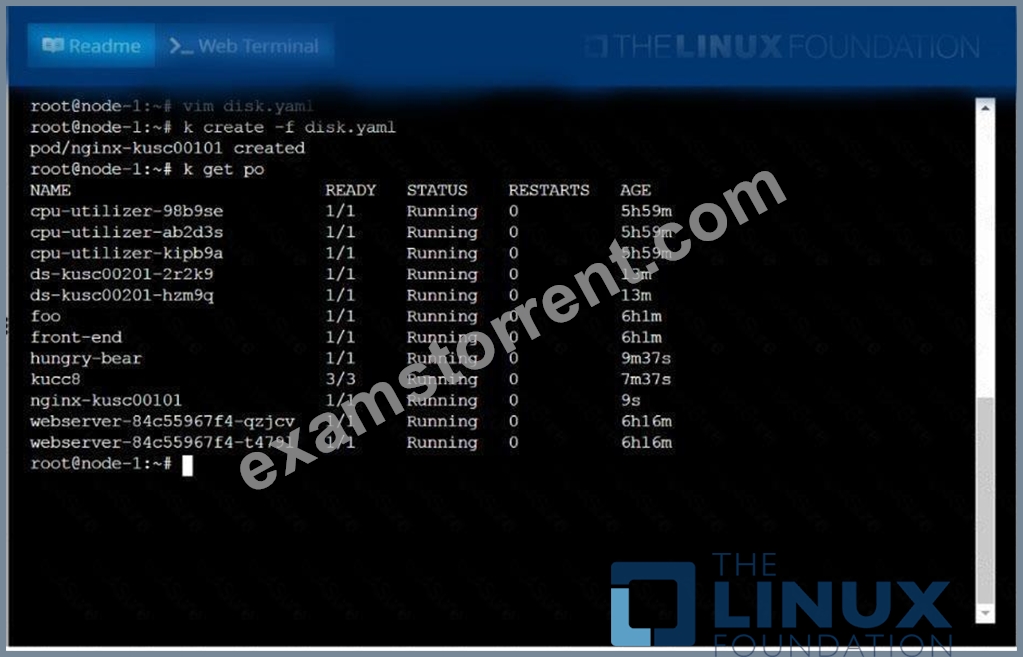
Schedule a pod as follows:
* Name: nginx-kusc00101
* Image: nginx
* Node selector: disk=ssd
Answer:
Explanation:
See the solution below.
Explanation
solution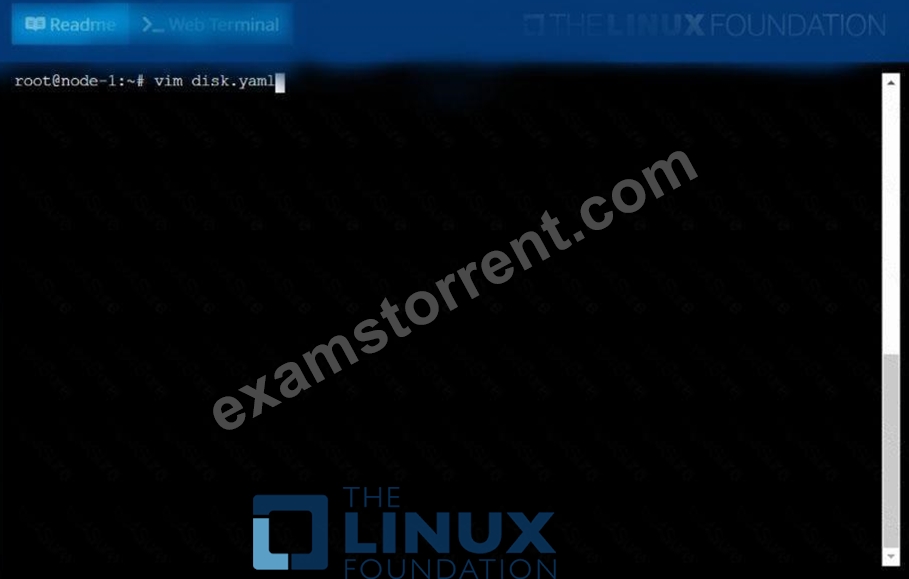
NEW QUESTION 33
Annotate the pod with name=webapp
- A. kubectl annotate pod nginx-dev-pod name=webapp
kubectl annotate pod nginx-prod-pod name=webapp
// Verify
kubectl describe po nginx-dev-pod | grep -i annotations
kubectl describe po nginx-prod-pod | grep -i annotations - B. kubectl annotate pod nginx-dev-pod name=webapp
kubectl annotate pod nginx-prod-pod name=webapp
// Verify
kubectl describe po nginx-dev-pod | grep -i annotations
Answer: A
NEW QUESTION 34
Create a deployment as follows:
Name: nginx-random
Exposed via a service nginx-random
Ensure that the service & pod are accessible via their respective DNS records The container(s) within any pod(s) running as a part of this deployment should use the nginx Image Next, use the utility nslookup to look up the DNS records of the service & pod and write the output to
/opt/KUNW00601/service.dns and /opt/KUNW00601/pod.dns respectively.
Answer:
Explanation:
See the solution below.
Explanation
Solution:
F:\Work\Data Entry Work\Data Entry\20200827\CKA\17 C.JPG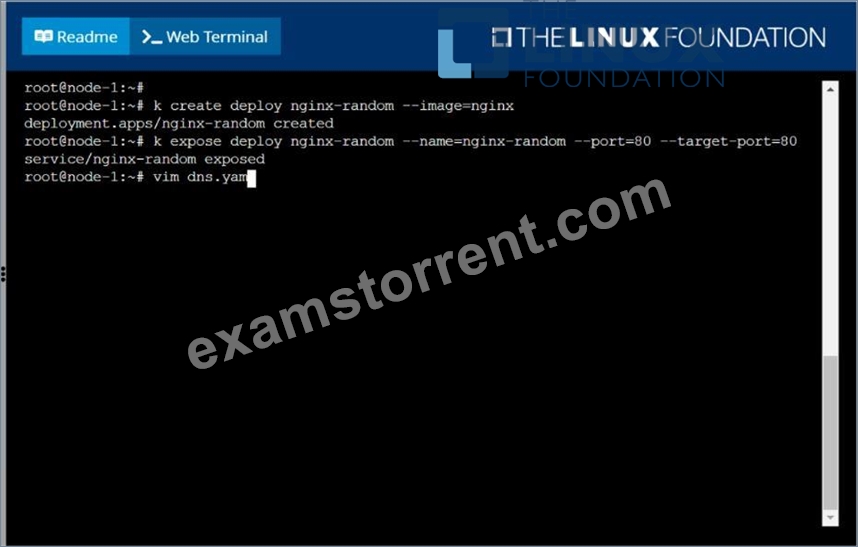
F:\Work\Data Entry Work\Data Entry\20200827\CKA\17 D.JPG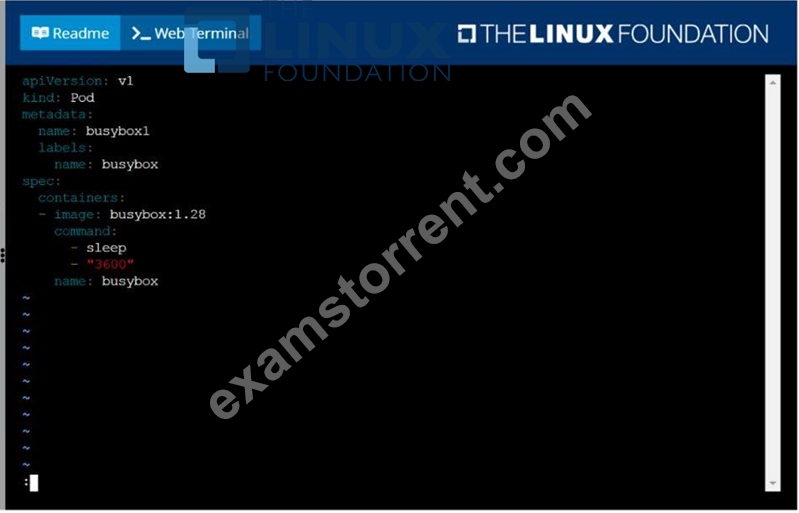
F:\Work\Data Entry Work\Data Entry\20200827\CKA\17 E.JPG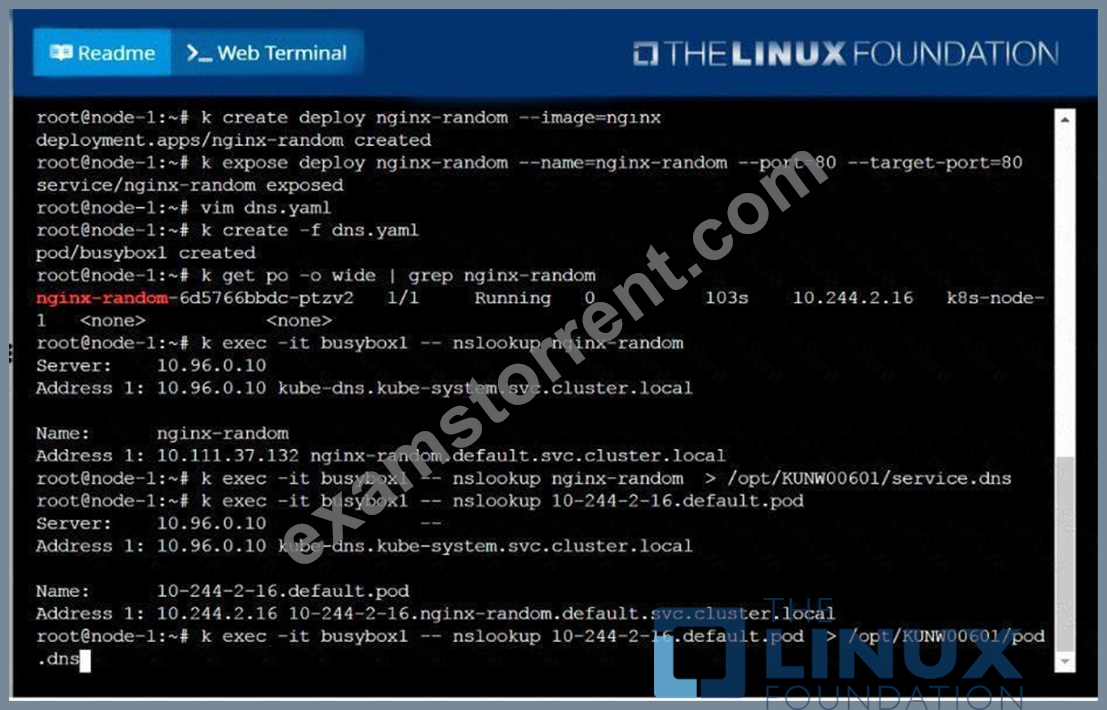
NEW QUESTION 35
Which one is the correct configuration?
- A. @Panorama
- B. &Panorama
- C. $Panorama
- D. #Panorama
Answer: C
NEW QUESTION 36
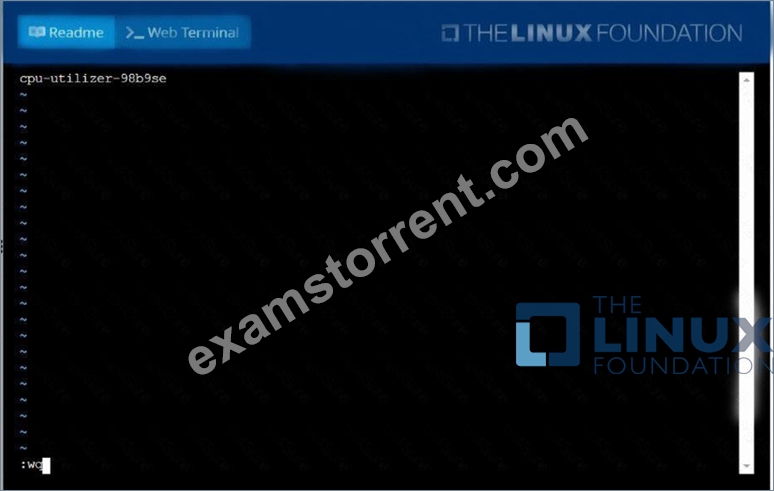
From the pod label name=cpu-utilizer, find pods running high CPU workloads and write the name of the pod consuming most CPU to the file /opt/KUTR00102/KUTR00102.txt (which already exists).
Answer:
Explanation:
See the solution below.
Explanation
solution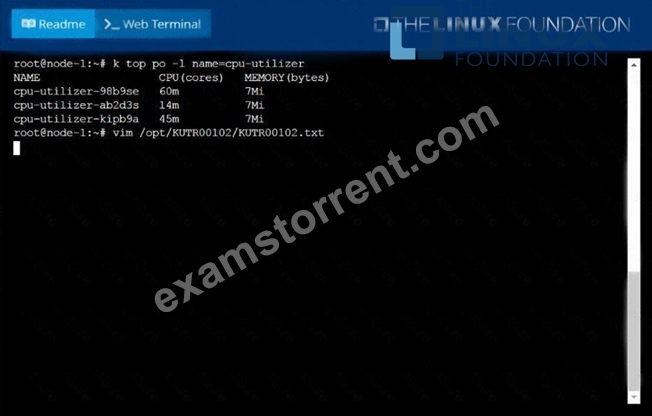
NEW QUESTION 37
Get the deployment rollout status
Answer:
Explanation:
kubectl rollout status deploy webapp
NEW QUESTION 38
Score: 4%
Task
Create a persistent volume with name app-data , of capacity 1Gi and access mode ReadOnlyMany. The type of volume is hostPath and its location is /srv/app-data .
Answer:
Explanation:
See the solution below.
Explanation
Solution:
#vi pv.yaml
apiVersion: v1
kind: PersistentVolume
metadata:
name: app-config
spec:
capacity:
storage: 1Gi
accessModes:
- ReadOnlyMany
hostPath:
path: /srv/app-config
#
kubectl create -f pv.yaml
NEW QUESTION 39
Create the nginx pod with version 1.17.4 and expose it on port 80
Answer:
Explanation:
kubectl run nginx --image=nginx:1.17.4 --restart=Never -- port=80
NEW QUESTION 40
Create an nginx pod with containerPort 80 and with a PersistentVolumeClaim "task-pv-claim" and has a mouth path "/usr/share/nginx/html"
- A. vim nginx-pvc-pod.yaml
apiVersion: v1
kind: Pod
metadata:
name: task-pv-pod
spec:
volumes:
- name: task-pv-storage
persistentVolumeClaim:
claimName: task-pv-claim
containers:
- name: task-pv-container
image: nginx
ports:
- containerPort: 60
name: "http"
volumeMounts:
- mountPath: "/usr/share/nginx/html"
name: task-pv-storage
kubectl apply -f nginx-pvc-pod.yaml
// Verify
kubectl describe po "POD-Name" | grep -i volumes -A4
Volumes:
task-pv-storage:
Type: PersistentVolumeClaim (a reference to a
PersistentVolumeClaim in the same namespace)
ClaimName: task-pv-claim
ReadOnly: false - B. vim nginx-pvc-pod.yaml
apiVersion: v1
kind: Pod
metadata:
name: task-pv-pod
spec:
volumes:
- name: task-pv-storage
persistentVolumeClaim:
claimName: task-pv-claim
containers:
- name: task-pv-container
image: nginx
ports:
- containerPort: 80
name: "http"
volumeMounts:
- mountPath: "/usr/share/nginx/html"
name: task-pv-storage
kubectl apply -f nginx-pvc-pod.yaml
// Verify
kubectl describe po "POD-Name" | grep -i volumes -A5
Volumes:
task-pv-storage:
Type: PersistentVolumeClaim (a reference to a
PersistentVolumeClaim in the same namespace)
ClaimName: task-pv-claim
ReadOnly: false
Answer: B
NEW QUESTION 41
Create a deployment named "myapp" that having 2 replicas with
nginx image and expose deployment as service named "myservice"
- A. // Create a YAML Template
kubectl create deploy myapp --image=nginx --dry-run -o yaml >
myapp.yaml
//Update replicas=2 in myapp.yaml file
apiVersion: apps/v1
kind: Deployment
metadata:
labels:
app: myapp
name: myapp
spec:
replicas: 2
selector:
matchLabels:
app: myapp
template:
metadata:
labels:
app: myapp
spec:
containers:
- image: nginx
name: nginx
// Create deployment
kubectl create -f myapp.yaml
// Creating YAML template for service
kubectl expose deployment myapp --type=ClusterIP --port=60 --
target-port=60 --name=myservice --dry-run -o yaml >
myservice.yaml
YAML File:
apiVersion: v1
kind: Service
metadata:
labels:
app: myapp
name: myservice
spec:
ports:
- port: 60
protocol: TCP
targetPort: 80
selector:
app: myapp
type: ClusterIP
kubectl get svc
NAME TYPE CLUSTER-IP EXTERNAL-IP PORT(S)
AGE
kubernetes ClusterIP 10.2.0.1 <none> 443/TCP
158d
myservice ClusterIP 10.2.96.175 <none> 80/TCP
40s - B. // Create a YAML Template
kubectl create deploy myapp --image=nginx --dry-run -o yaml >
myapp.yaml
//Update replicas=2 in myapp.yaml file
apiVersion: apps/v1
kind: Deployment
metadata:
labels:
app: myapp
name: myapp
spec:
replicas: 2
selector:
matchLabels:
app: myapp
template:
metadata:
labels:
app: myapp
spec:
containers:
- image: nginx
name: nginx
// Create deployment
kubectl create -f myapp.yaml
// Creating YAML template for service
kubectl expose deployment myapp --type=ClusterIP --port=80 --
target-port=80 --name=myservice --dry-run -o yaml >
myservice.yaml
YAML File:
apiVersion: v1
kind: Service
metadata:
labels:
app: myapp
name: myservice
spec:
ports:
- port: 80
protocol: TCP
targetPort: 80
selector:
app: myapp
type: ClusterIP
kubectl get svc
NAME TYPE CLUSTER-IP EXTERNAL-IP PORT(S)
AGE
kubernetes ClusterIP 10.2.0.1 <none> 443/TCP
158d
myservice ClusterIP 10.2.96.175 <none> 80/TCP
40s
Answer: B
NEW QUESTION 42
Deployment
a. Create a deployment of webapp with image nginx:1.17.1 with
container port 80 and verify the image version
- A. // Create initial YAML file with -dry-run option
kubectl create deploy webapp --image=nginx:1.17.1 --dryrun=client -o yaml > webapp.yaml vim webapp.yaml apiVersion: apps/v1 kind: Deployment metadata:
labels:
app: webapp
name: webapp
spec: replicas: 1 selector: matchLabels: app: webapp template: metadata: labels: app: webapp spec: containers: - image: nginx:1.17.1 name: nginx kubectl create -f webapp.yaml -record=true //Verify Image Version kubectl describe deploy webapp | grep -i "Image" Using JsonPath kubectl get deploy -o=jsonpath='{range.items [*]}{.[*]} {.metadata.name}{"\t"}{.spec.template.spec.containers[*].i mage}{"\n"}' - B. // Create initial YAML file with -dry-run option
kubectl create deploy webapp --image=nginx:1.17.1 --dryrun=client -o yaml > webapp.yaml vim webapp.yaml apiVersion: apps/v1 kind: Deployment metadata:
labels:
app: webapp
name: webapp
spec: replicas: 1 containers: - image: nginx:1.17.1 name: nginx kubectl create -f webapp.yaml -record=true //Verify Image Version kubectl describe deploy webapp | grep -i "Image" Using JsonPath kubectl get deploy -o=jsonpath='{range.items [*]}{.[*]} {.metadata.name}{"\t"}{.spec.template.spec.containers[*].i mage}{"\n"}'
Answer: A
NEW QUESTION 43
A bootstrap USB flash drive has been prepared using a Linux workstation to load the initial configuration of a Palo Alto Networks firewall. The USB flash drive was formatted using file system ntfs and the initial configuration is stored in a file named init-cfg.txt.
The contents of Init-cfg.txt in the USB flash drive are as follows:
type=static
ip-address=10.5.107.19
default-gateway=10.5.107.1
netmask=255.255.255.0
Ipv6-address=2001:400:100::1/64
ipv6-default-gateway=2001:400:100::2
hostname=Ca-FW-DC1
panorama-server=10.5.107.20
panorama-server-2=10.5.107.21
tplname=FINANCE TG4
dgname=finance_dg
dns-primary=10.5.6.6
op-command-modes multi-vsys.jumbo-frame
dhcp-send-hostname=no
dhcp-send-client-id=no
dhcp-accept-server-hostname=no
dhcp-accept-server-domain=no
The USB flash drive has been inserted in the firewalls' USB port, and the firewall has been powered on.Upon boot, the firewall fails to begin the bootstrapping process. The failure is caused because:
- A. The USB must be formatted using the ext4 file system
- B. nit-cfg bit is an incorrect filename the correct filename should be init-ofg.xml
- C. There must be commas between the parameter names and their values instead of the equal symbols
- D. The bootstrap.xml file is a required file, but it is missing
- E. The USB drive has been formatted with an unsupported file system
Answer: A
NEW QUESTION 44
List pod logs named "frontend" and search for the pattern "started" and write it to a file "/opt/error-logs"
Answer:
Explanation:
Kubectl logs frontend | grep -i "started" > /opt/error-logs
NEW QUESTION 45
Get the DNS records for the service and pods for the deployment redis and the put the value in /tmp/dnsrecordpod and /tmp/dnsrecord-service
- A. // Get Pod Ip
kubectl get po -o wide
// Get Service Name
kubectl get svc
// Create a temporary pod and execute nslookup command
Note: POD IP format should be a-b-c-d and not a.b.c.d
kubectl run busybox --image=busybox:1.28 --restart=Never -
-rm -it -- nslookup 192-168-0-69.default.pod >
/tmp/dnsrecord-pod
kubectl run busybox1 --image=busybox:1.26 --restart=Never
--rm -it -- nslookup redis-service > /tmp/dnsrecordservice
//Verify
cat /tmp/dnsrecord-pod
Server: 10.2.8.10
Address 1: 10.2.0.10 kube-dns.kube system.svc.cluster.local Name: 192-168-0-69.default.pod Address 1: 192.168.0.69 192-166-0-69.redis service.default.svc.cluster.local cat /tmp/dnsrecord-pod Server: 10.2.0.10 Address 1: 10.2.0.10 kube-dns.kube system.svc.cluster.local Name: 192-168-0-69.default.pod Address 1: 192.168.0.69 192-168-0-69.redis service.default.svc.cluster.local - B. // Get Pod Ip
kubectl get po -o wide
// Get Service Name
kubectl get svc
// Create a temporary pod and execute nslookup command
Note: POD IP format should be a-b-c-d and not a.b.c.d
kubectl run busybox --image=busybox:1.28 --restart=Never -
-rm -it -- nslookup 192-168-0-69.default.pod >
/tmp/dnsrecord-pod
kubectl run busybox1 --image=busybox:1.28 --restart=Never
--rm -it -- nslookup redis-service > /tmp/dnsrecordservice
//Verify
cat /tmp/dnsrecord-pod
Server: 10.2.0.10
Address 1: 10.2.0.10 kube-dns.kube system.svc.cluster.local Name: 192-168-0-69.default.pod Address 1: 192.168.0.69 192-168-0-69.redis service.default.svc.cluster.local cat /tmp/dnsrecord-pod Server: 10.2.0.10 Address 1: 10.2.0.10 kube-dns.kube system.svc.cluster.local Name: 192-168-0-69.default.pod Address 1: 192.168.0.69 192-168-0-69.redis service.default.svc.cluster.local
Answer: B
NEW QUESTION 46
Get the list of pods of webapp deployment
- A. // Get the label of the deployment
kubectl get deploy --show-labels
kubectl get pods -l app=webapp - B. // Get the label of the deployment
kubectl get deploy --show-labels
// Get the pods with that label
kubectl get pods -l app=webapp
Answer: B
NEW QUESTION 47
Create a pod as follows:
* Name:mongo
* Using Image:mongo
* In anew Kubernetes namespacenamed:my-website
Answer:
Explanation:
See the solution below.
Explanation
solution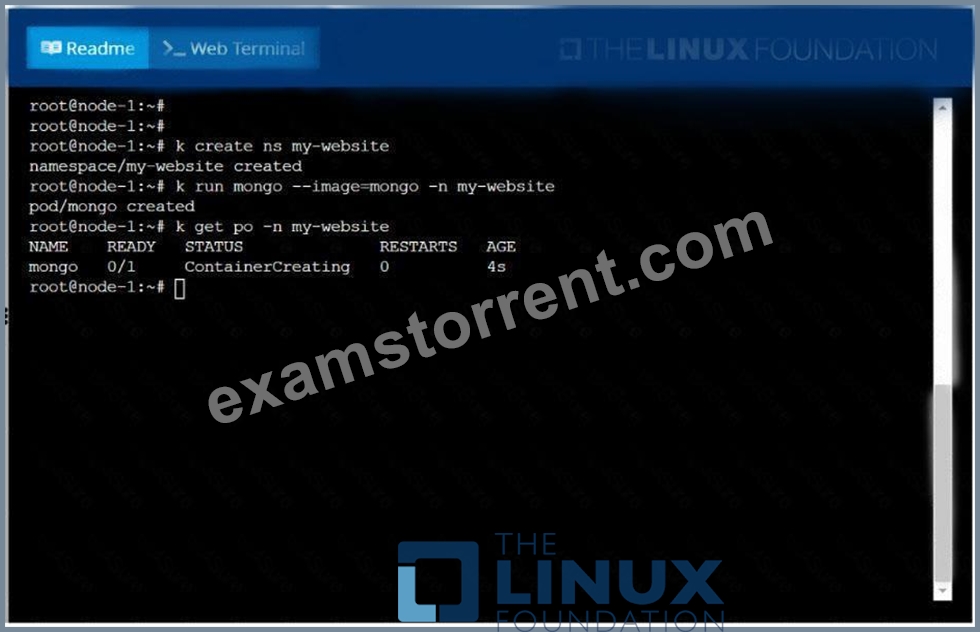
NEW QUESTION 48
......
For more info read reference:
Linux Foundation-CKA Official Certification Site
How to Prepare For Linux Foundation-CKA: Certified Kubernetes Administrator Exam
Preparation Guide for Linux Foundation-CKA: Certified Kubernetes Administrator Exam
Introduction
This certification is for Kubernetes administrators, cloud administrators and other IT professionals who manage Kubernetes instances. A certified K8s administrator has demonstrated the ability to do basic installation as well as configuring and managing production-grade Kubernetes clusters. They will have an understanding of key concepts such as Kubernetes networking, storage, security, maintenance, logging and monitoring, application lifecycle, troubleshooting, API object primitives and the ability to establish basic use-cases for end users. This learning path is intended specifically for Kubernetes cluster administrators. Anyone interested in learning how to work with Kubernetes will also benefit from this CNCF CKA practice exams and CNCF CKA practice test.
Responsibilities of a Kubernetes administrator involve designing and implementing solutions to leverage a Kubernetes cluster, configuring hardware, peripherals, and services, managing settings and storage, deploying cloud-native applications, and monitoring and supporting a Kubernetes environment. You also undertake duties like researching opportunities for automation, troubleshooting issues as reported by users, and mentoring junior team members in best practices. You often collaborate with other members of the IT team using tools like GIT to promote security, efficiency, and scalability of core services and capabilities.
Kubernetes is one of the world’s most popular container orchestration tools. Established by the Cloud Native Computing Foundation (CNCF), the Kubernetes Administrator certification is designed to validate your skills for working with Kubernetes. This learning path is designed to help you prepare you for the CKA exam. It includes a combination of courses covering each exam domain, a series of labs to build hands-on Kubernetes experience working directly in a live cloud environment, and exams to test your knowledge along the way.
A Kubernetes Adminstrator requires strong experience with Windows, Linux, or Unix system administration, as well as solid skills with orchestration platforms, such as ECS, Kubernetes, or Mesos. Knowledge of SQL databases and basic coding skills in Java, JavaScript, PHP, or a similar language are all desirable, as is experience with microservices architectures. Many positions require a bachelorâs degree in computer science, networking, or a related field. This exam to become a Certified Kubernetes Administrator (CKA) will enhance your qualifications and expand your income potential.
Linux Foundation CKA Real 2022 Braindumps Mock Exam Dumps: https://www.examstorrent.com/CKA-exam-dumps-torrent.html
CKA Exam Questions | Real CKA Practice Dumps: https://drive.google.com/open?id=1ahy09hKS5JjP3xY33XjxezduDcg2DWlC