


[UPDATED] Salesforce Plat-Dev-210 Certification Exam Questions
Quickly and Easily Pass Salesforce Exam with Plat-Dev-210 real Dumps
Salesforce Plat-Dev-210 Exam Syllabus Topics:
| Topic | Details |
|---|---|
| Topic 1 |
|
| Topic 2 |
|
| Topic 3 |
|
NEW QUESTION # 42
A developer has a requirement to create a child FlexCard that contain all of its parent FlexCard's records in a Datatable.
- A. {Params records}
- B. {Records}
- C. {Records[0]}
- D. {recordId}
Answer: B
Explanation:
The correct syntax for passing all of the parent FlexCard's records to a child FlexCard is {Records}, which represents an array of records. The other options are incorrect because they either use an invalid syntax or refer to a single record instead of an array of records.
NEW QUESTION # 43
A developer creates a Flexcard that displays a contact's mailing address and passes the contact's postal code to a child FlexCard.
When configuration text elements in the child FlexCard, what syntax should a developer use to refer to the contact's postal code?
- A. {Parent.postalcode}
- B. {Params.postalcode}
- C. {Records.postalcode}
- D. {Postalcode}
Answer: B
Explanation:
The Params node contains the data that is passed from the parent FlexCard to the child FlexCard. The developer should use {Params.postalcode} to refer to the contact's postal code in the child FlexCard.
NEW QUESTION # 44
The OmniScript must retrieve device details stored in the Asset object and then call an external system to send troubleshooting commands via REST API to the device.
Which two OmniScript element should the developer use to configure this functionality?
- A. SOQL Action
- B. Navigation Action
- C. DataRaptor Extract Action
- D. HTTP Action
- E. REST API Action
Answer: C,D
Explanation:
According to the OmniScript Action Elements page, a DataRaptor Extract Action can be used to "get data from one or more Salesforce records" and an HTTP Action can be used to "get, save, or delete data through a web application programming interface (API)".
NEW QUESTION # 45
A developer needs to limit the output of a Data Mapper Extract to a maximum of one result.
How should the developer configure this?
- A. Use a Custom Output Type when creating the Data Mapper.
- B. Set the Limit property on the action that calls the Data Mapper Extract.
- C. Define a formula with the Filter function.
- D. Use the LIMIT filter on the Extract definition.
Answer: B
Explanation:
According to the OmniStudio DataRaptor Extract documentation, if a developer wants to limit the number of records returned, the best way is to set the "Limit" property on the element or action that is calling the DataRaptor, such as in an Integration Procedure or OmniScript Action.
* A. Set the Limit property on the action that calls the Data Mapper Extract - This is the correct method. The calling context (e.g., OmniScript Action or Integration Procedure) includes a property for setting the limit on query results, which is a recommended and clean method to ensure only one record is retrieved.
Incorrect Options:
* B. There is no "LIMIT" clause within the DataRaptor Extract definition UI or JSON definition itself.
* C. Custom Output Type controls the structure, not the quantity of output.
* D. The Filter function applies conditional logic, not record count.
:
Salesforce OmniStudio Developer Guide # DataRaptor Extract Configuration
NEW QUESTION # 46
A developer examines data received from an external data source. The data is nested two levels down in the JSON structure.
Which OmniStudio tool could the developer use to simplify this data?
- A. An integration Procedure
- B. A DataRaptor Transform
- C. A guided workflow
- D. An HTTP Action Element
Answer: B
Explanation:
A DataRaptor Transform can simplify nested data by transforming it into a flat structure. The developer can use JSON paths to map the input data to the output data and define the output structure.
NEW QUESTION # 47
A developer needs to create a list of cases for an account in a single Datable in a FlexCard. Like the one shown below.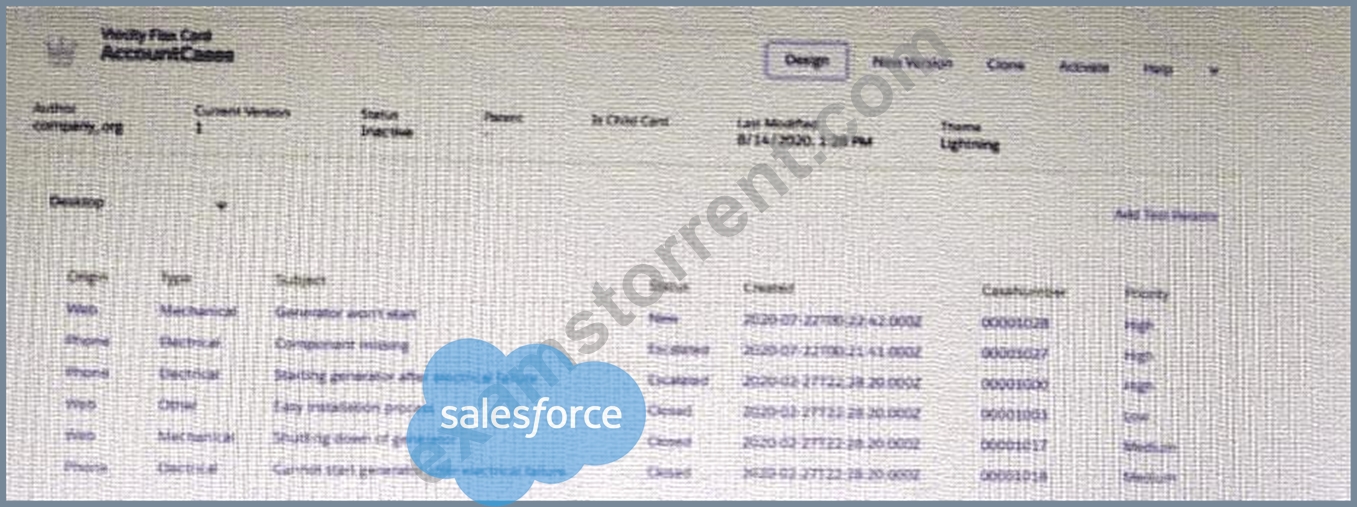
How can the developer configure the FlexCard to display the case records in this way?
- A. Disable the Repeat Record feature on the FlexCard setup tab
- B. Select the Repeatable Mode property on the data table elements
- C. Enable the Repeat Records feature on the FlexCard Setup tab
- D. Enable the record Looping feature on the data table elements
Answer: B
Explanation:
The Repeatable Mode property on the data table elements allows the developer to display multiple records in a single data table. The Repeat Records feature on the FlexCard Setup tab is used to display multiple FlexCards for each record in a data source. The Record Looping feature on the data table elements is used to iterate over a list of records and perform actions on each record. The Overwrite Target for all Null input checkbox on the Account id field is used to overwrite the existing value in the target object with null if the input value is null.
NEW QUESTION # 48
When launching an OmniScript from an action on a FlexCard, the OmniScript displays, but no Salesforce data is populated:
Which two errors could cause this behavior?
Choose 2 answers
Choose 2 answers
- A. The Id Field for Actions in the FlexCard is blank.
- B. There is non active version of the OmniScript
- C. There is no active version of the Data Raptor Extract.
- D. In the DataRaptor Extract Action, the Input Parameters Filter Value is misspelled.
Answer: A,D
Explanation:
The Id Field for Actions in the FlexCard specifies which field from the FlexCard data source will be used as the record ID for the OmniScript. If this field is blank, the OmniScript will not receive any record ID and will not be able to retrieve any Salesforce data. In the DataRaptor Extract Action, the Input Parameters Filter Value determines how to filter the data based on the record ID. If this value is misspelled, the DataRaptor Extract will not be able to match the record ID and will not return any data.
NEW QUESTION # 49
A developer has a requirement to create a child FlexCard that contains all of its parent FlexCard's records In a Datable How should the developer configure the parent FlexCard's Node?
- A. {Records {0}}
- B. {Records}
- C. {Recorded}
- D. {Params, records}
Answer: B
Explanation:
The Node field for the parent FlexCard should be set to {Records}, which is an array of all the records retrieved by the parent FlexCard data source. This will allow the child FlexCard to access the records and display them in a DataTable.
NEW QUESTION # 50
...... configure Additional input to send exactly the same data? Assume that the develop checkedSend Only Additional input.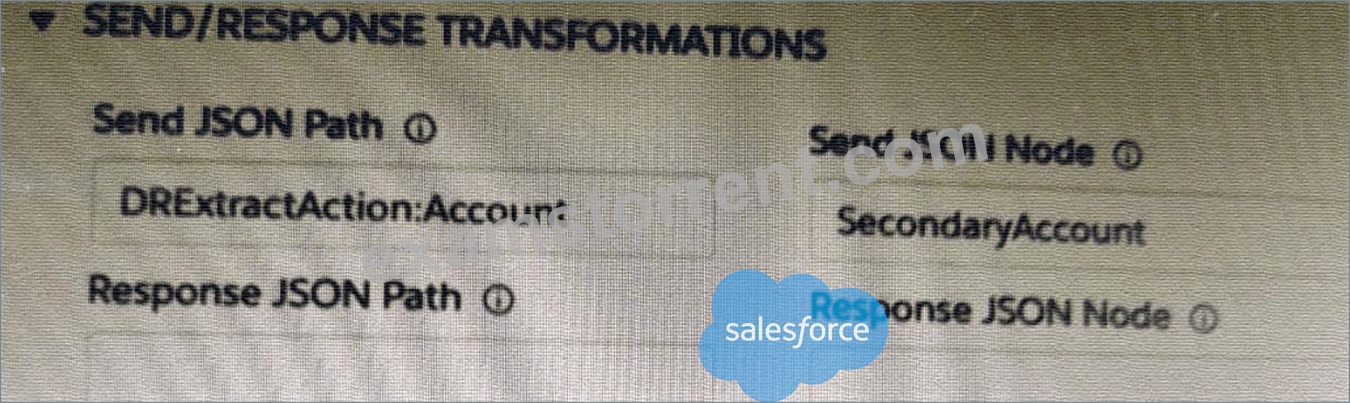
- A.

- B.

- C.

- D.

Answer: A
Explanation:
Option D is the correct way to configure Additional input to send exactly the same data as Input Data. The Additional input should have the same key/value pairs as Input Data, and the value should be set to
{{InputData.key}} for each key. This will pass the value of Input Data for each key to Additional input.
NEW QUESTION # 51
A healthcare company wants to enable its subscribers to add, edit, or delete dependents related to their policy Community portal. The developer on the project decides to use an MniScript.
How should the developer configure the OmniScript to providethis functionality?
- A. Use a Text Block element and a Remote Action element.
- B. Use an Edit Block element configured with SOQL statements.
- C. Use an Input Block element and a DataRaptor Post Action element.
- D. Use an Edit Block element configured with Remote Actions.
Answer: D
Explanation:
An Edit Block element configured with Remote Actions allows the developer to create a dynamic table that can display, add, edit, or delete records from a Salesforce object. The Remote Actions can be configured to perform CRUD operations on the object using SOQL or Apex.
NEW QUESTION # 52
Refer to the exhibit below.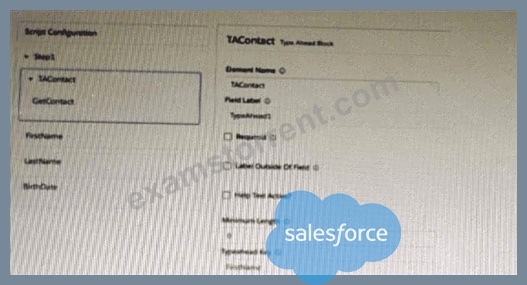
What is the reason that the fields fail to display the fetched data?
- A. The typeHead key is not in the correct format.
- B. Lookup Mode is selected in the properties of the Type Ahead Block.
- C. FirstName, LastName, and BirthDate are not placed inside the Type Ahead Block.
- D. Use Data JSON is Not selected in the properties of the Type Ahead Block.
Answer: D
Explanation:
The Use Data JSON property must be selected in the properties of the Type Ahead Block in order to display the fetched data in the fields. The Lookup Mode property is used to specify the type of lookup to perform. The FirstName, LastName, and BirthDate fields can be placed inside or outside the Type Ahead Block. The typeHead key is in the correct format.
NEW QUESTION # 53
A customer sets up two LWC OmniScripts, one embedded into another. AccountId is set in a Set Values element in the parent OmniScript. The Accountid set in the parent OmniScript is used to set another Set values element ContextAccountId in the emvedded OmniScript. The embedded OmniScript is activated.
While previewing the OmniScript flow from the parent, it is found that Account I set correct in the parent OmniScript. However, ContextAccount in the embedded OmniScript is not set with the Accountid from parent OmniScript. On previewing the embedded OmniScript individually. It is found that ContextAccountId is set correctly.
What is the reason for this? Refer to the exhibit below.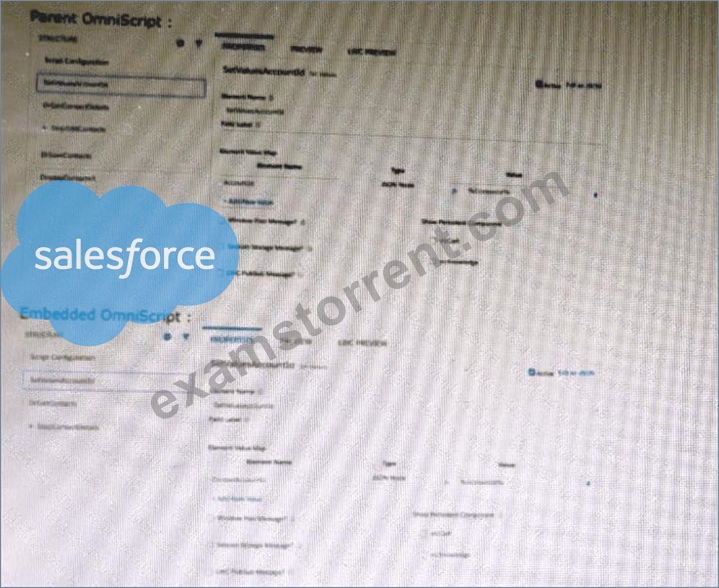
- A. A developer failed to includea Navigate Action Element to pass data from the parent OmniScript.
- B. Both parent and embedded OmniScripts have the same element name for the Set Values element.
- C. The flag passData.JSON in the parent OmniScript in not configured correctly.
- D. The WLC PubSub Messge flag in the Set Values action of the parent OmniScript has not been set.
Answer: D
Explanation:
The LWC PubSub Message flag in the Set Values action of the parent OmniScript enables the parent OmniScript to send data to the embedded OmniScript using a custom event. If this flag is not set, the data will not be passed to the embedded OmniScript
NEW QUESTION # 54
An integration Procedure uses an HTTP action to makea REST API call. The response from the REST API must be converted into a specific XML structure before sending it as an input to another external wen service.
How should the developer configure the Integration Procedure to meet this requirement?
- A. Use a Remote Action that calls the XMLStreamReader class
- B. Use a DataRaptor Extract and check the XML checkbox on the Output JSON Path.
- C. Use a Remote Action that calls the XMLStreamWriter class
- D. Use a DataRaptor Transform to convert JSON to XML
Answer: D
Explanation:
According to the OmniStudio Developer Guide, "DataRaptor Transform actions can convert JSON to XML and vice versa." Therefore, the correct answer is C.
NEW QUESTION # 55
A developer needs to retrieve data from an external system that stores policy data. The external system supports REST APIs to access and update thepolicies. Due to the volume of the policy data and peak hours of business, calls to the REST APIs sometimes take longer than expected to respond.
The developer creates an Integration Procedure to retrieve the policy data for use in an OmniScript.
Given theexternal system's known performance issues, which two configurations should be used to implement the call to the external system?
Choose 2 answers
- A. Configure a Remote action with timeout settings of 120000
- B. Set the Timeout property on the HTTP Action in the Integration Procedure
- C. Check the Chain On Step checkbox on the HTTP Action in the Integration Procedure
- D. Check the Chainable checkboxon the Integration Procedure Action in the OmniScript
Answer: B,C
Explanation:
The Timeout property on the HTTP Action in the Integration Procedure specifies how long to wait for a response from the external system before throwing an error. The Chain On Step checkbox on the HTTP Action in the Integration Procedure indicates that the next action should be executed only if the current action is successful. These two configurations should be used to implement the call to the external system given its known performance issues.
NEW QUESTION # 56
A developer is configuring an integration Procedure Action in an OmniScript. The Omniscript needs a JSON response from the Integration Procedure but does not need to wait for the response for the user to proceed.
Which feature should the developer enable?
- A. Toast Completion
- B. Use Future
- C. Invoke Mode Fire and Forget
- D. Invoke Mode Non-Blocking
Answer: C
Explanation:
The Invoke Mode Fire and Forget feature enables the OmniScript to invoke the Integration Procedure without waiting for a response. This is useful when the response is not needed for the user to proceed
NEW QUESTION # 57
A developer needs to configure a Data Mapper to retrieve data from a single object. The structure of the output data does not need to be changed.
Following best practices, which type of Data Mapper should the developer use?
- A. Data Mapper Turbo Extract
- B. Data Mapper Extract
- C. Data Mapper Load
- D. Data Mapper Transform
Answer: A
Explanation:
The correct answer is D. Data Mapper Turbo Extract, based on best practices in the official OmniStudio documentation.
From the OmniStudio Developer Guide # DataRaptors # Turbo Extract:
* DataRaptor Turbo Extract is a lightweight, high-performance extract designed specifically for retrieving data from a single Salesforce object, where no data transformation or complex joins are required.
* It is recommended over DataRaptor Extract for performance reasons when only one object and minimal transformation is needed.
Why not the others?
* A. DataRaptor Load is used for writing data to Salesforce, not retrieving.
* B. DataRaptor Transform is used when you need to transform data, not simply extract it.
* C. DataRaptor Extract can be used, but Turbo Extract is preferred for the use case of single object, no transformation - per best practices.
:
Salesforce OmniStudio Developer Guide # DataRaptor Turbo Extract Best Practices OmniStudio Certification Study Guide # "When to use Turbo Extract"
NEW QUESTION # 58
What should a developer's first step be when troubleshooting whether a DataRaptor Extract is retrieving data?
- A. Deactivate the card and layout, and go to the PREVIEW tab for the card to test.
- B. Go to the Lightning Console and reload the page to test.
- C. Go to the PREVIEW tab In OmniScript to test.
- D. Add a key/value pair in the DataRaptor to test it.
Answer: C
Explanation:
The PREVIEW tab in OmniScript allows the developer to test the DataRaptor Extract by providing a record ID and viewing the output data. This is a quick and easy way to troubleshoot whether the DataRaptor Extract is retrieving data correctly.
NEW QUESTION # 59
Refer to the exhibit below. A developer has configured an integration Procedure element with Additional input.
Alternatively, how could the developer configure SEND/RESPONSE TRNSFORMATION to send exactly the same data? Assume the developer has un-checked Send Only Additional input.
- A.

- B.

- C.

- D.

Answer: C
Explanation:
The Send JSON Path syntax for accessing an element from an Integration Procedure structure is BlockName.
ElementName. In this case, the BlockName is BlockX and the ElementName is ActionZ. The colon (:) is used to separate the input and output parameters, not the block and element names. The order of the block and element names should follow the hierarchy of the structure, from top to bottom. The Additional input parameter is not needed in this case, as it is already included in the Send JSON Path.
NEW QUESTION # 60
Which two of these options can a developer use to retrieve data from a Salesforce object?
Choose 2 answers
- A. Data Mapper Post Action
- B. Data Mapper Extract Action
- C. Lookup Input Element
- D. Data Mapper Load Action
Answer: B,C
Explanation:
To retrieve (read) data from Salesforce objects:
* A. Data Mapper Extract Action - Correct. A DataRaptor Extract is specifically used to retrieve data from Salesforce, based on input parameters or context.
* C. Lookup Input Element - Correct. This is used within OmniScripts to look up a record by matching input data, essentially performing a read operation.
Incorrect Options:
* B. DataRaptor Post is not a valid DataRaptor type.
* D. DataRaptor Load Action is used for writing/updating data, not retrieving it.
:
Salesforce OmniStudio Guide # DataRaptor Types and Lookup Input Element Usage
NEW QUESTION # 61
In an Integration Procedure, a developer needs to perform a multi-step calculation on every element of an array.
Based on best practices, what two methods are recommended?
Choose 2 answers
- A. Use a Set Values Element inside a Loop Block.
- B. Use a Calculation Action to call a Calculation Procedure.
- C. Use a Matrix Action to call a Calculation Matrix.
- D. Use a List Action to merge the array elements together.
Answer: B,C
Explanation:
According to the Integration Procedure Actions page, a Calculation Action can be used to "call a Calculation Procedure that performs calculations on input data" and a Matrix Action can be used to "call a Calculation Matrix that performs calculations on input data".
NEW QUESTION # 62
A developer is configuring an Integration Procedure Action in an OmniScript. The OmniScript needs a JSON response from the Integration Procedure but does not need to wait for the response for the user to proceed.
Which feature should the developer enable?
- A. Toast Completion
- B. Use Future
- C. Invoke Mode Fire and Forget
- D. Invoke Mode Non-Blocking
Answer: C
Explanation:
In OmniStudio, the Invoke Mode: Fire and Forget setting allows an OmniScript to call an Integration Procedure asynchronously, meaning it does not wait for the response to complete before continuing user interaction.
* C. Invoke Mode Fire and Forget - This is the correct setting. It's designed specifically for use cases where the user experience should not be blocked by backend processing.
Incorrect Options:
* A. Use Future is not a valid OmniScript configuration option.
* B. Invoke Mode Non-Blocking is not an official setting in OmniStudio terminology.
* D. Toast Completion is a UI notification setting and does not impact execution behavior.
:
OmniStudio Developer Guide # Integration Procedure Actions in OmniScripts
NEW QUESTION # 63
......
Start your Plat-Dev-210 Exam Questions Preparation: https://www.examstorrent.com/Plat-Dev-210-exam-dumps-torrent.html
Realistic Plat-Dev-210 Dumps Questions To Gain Brilliant Result: https://drive.google.com/open?id=18f6t7eQGQpUrfN4NUv7FCBt7y_haNbe0